Friday, 25 March 2022

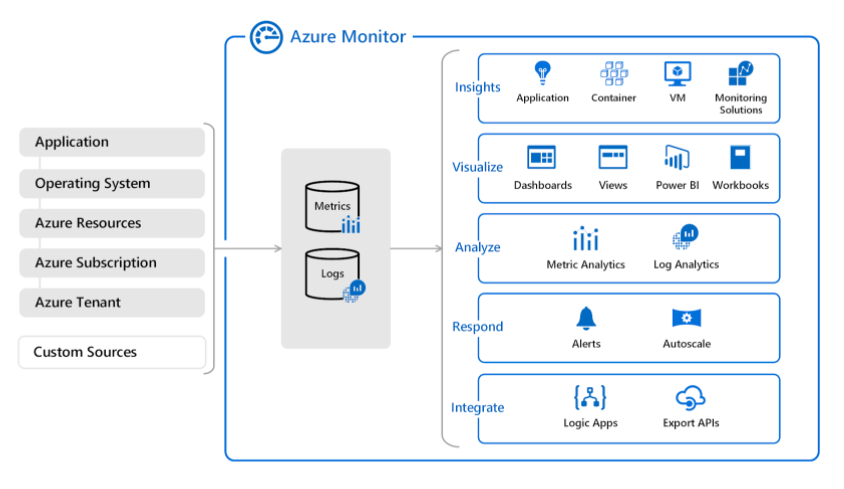
Azure Monitor


  • Monitoring tool for your Azure resources and applications.
  • A service to display the metrics of your resources. You can also configure alerts that send notifications when a threshold is breached.

azure monitor

Features

  • Metrics represents a time-ordered set of data points that are published to Azure Monitor.
  • The metrics collected are stored for a maximum of 93 days.
  • Share your dashboards with other users using Azure Dashboards.
  • The data is stored as a set of records in either the Log Analytics or Application Insights.
  • You may use log analytics to collect and store the data from various log sources and use a custom query language to query them.
  • Application Insights helps you detect and diagnose issues across applications and dependencies.
  • When important conditions are found in your monitoring data, you can create an alert rule to identify and address issues.
  • You can export basic usage metrics from your CDN endpoint with diagnostic logs.
  • To connect Azure to a supported IT Service Management (ITSM) product or service, you need to use an ITSM Connector (ITSMC)
  • ITSMC supports connections to the following ITMS tools: Cherwell, Provance, ServiceNow, and System Center Service Manager.

Log Analytics

  • All log data obtained by Azure Monitor shall be stored in a Log Analytics workspace
  • Query simple to advanced logs.
  • The data is retrieved from a workspace using a log query written using Kusto Query Language (KQL).
  • The queries that you can run are:
    • Table-based queries – the query organizes log data into tables.
    • Search queries – use this query if you need to find a specific value in your table.
    • Sort and top – to display the results in a particular order, you must sort the preferred column. To get the latest records in the entire table, you can use top.
    • Where – this operator allows you to add a filter to a query. You can use different expressions when writing filter conditions.
    • Time filter in query – you can define a specific time range by adding the time filter to the query.
    • Project and Extend – project allows you to select specific columns and extend will add additional columns.
    • Summarize – you can identify a group of records and apply aggregations using the summarize operator.
  • If the query includes workspaces in 20 or more regions, your query will be blocked from running.
  • Log Analytics results are limited to a maximum of 10,000 records.
  • With a log analytics agent, you can collect logs and performance data from virtual or physical devices outside Azure.
  • Log analytics agent cannot send data to Azure Monitor Metrics, Azure Storage, or Azure Event Hubs.

Application Insights

  • Enables you to monitor custom events and metrics.
  • Monitor diagnostic trace logs from your application.
  • You can identify performance anomalies, diagnose issues, and understand user activities in live applications.
  • Monitor the performance, health, and running processes of virtual machines and virtual machines scale sets.
  • You can also monitor the performance, capacity, and availability of storage accounts.
  • Insights provide a comprehensive view of the performance, health, and utilization of container workloads in Azure Container Instances or clusters hosted on Azure Kubernetes Service.
  • Monitor the health and metrics of all network resources.
  • It provides a unified view of all Azure Key vaults’ requests, failures, operations, and latency.
  • Monitor the overall performance, capacity, failures, and operational health of all Azure Cosmos DB resources and Azure Cache for Redis.

Pricing

  • You pay for the ingestion and retention of data in Log Analytics (per GB/month).
  • You are billed for the number of metrics you have per month.
  • There are no charges for health criteria alerts.

Microsoft Compliance Offerings


  • Microsoft Trust Center provides access to security, privacy, and compliance information.
    • Security – provides information about identity & access management, threat & information protection, and cloud security.
    • Privacy – provides information on how you can secure your data at rest and in transit.
    • Compliance – provides information about industry-specific requirements, audit reports, and shared responsibility.
  • Microsoft Privacy Statement explains how Microsoft collects personal data, how they use it, and the reasons why they need to share personal data.
  • The terms and conditions when you purchase licenses for products and online services through Microsoft Volume Licensing programs are documented in Online Services Terms (OST).
  • The Data Protection Amendment (DPA) sets the responsibilities of the customer and Microsoft with respect to the collection and protection of Customer Data and Personal Data in accordance with Azure.

National Institute of Standards and Technology (NIST)

  • NIST maintains measurement standards and guidance to help organizations assess risk.
  • NIST releases a Framework for Improving Critical Infrastructure Cybersecurity (FICIC) to strengthen the cybersecurity of federal networks and critical infrastructures.
  • The NIST Cybersecurity Framework (CSF) consists of standards, guidelines, and best practices to manage cybersecurity-related risks.
  • Quickly build NIST CSF solutions on Azure using the Azure Security and Compliance NIST CSF Blueprint.

General Data Protection Regulation (GDPR)

  • GPDR establishes new rules for organizations that offer goods and services to citizens in the European Union.
  • It also collects and analyzes data of EU residents. The GDPR applies no matter where your company is located.
  • GDPR grants individuals certain rights to manage the personal data gathered by an organization through a Data Subject Request (DSR).
  • GDPR requires an organization to provide timely information on DSRs, data breaches, and to conduct data protection impact assessments (DPIAs).

International Organization for Standardization (ISO)

  • ISO provides international standards to safeguard consumers and end-users of products and services.
  • The International Electrotechnical Commission (IEC) is an organization that prepares and publishes international standards for electrical, electronic, and related technologies.
  • ISO/IEC 27001 is an information security management standard designed to bring information security under explicit management control.
  • If a company has been granted with an ISO certification, it means that it has established standards and general principles in the initiation, implementation, maintenance, and improvement of information security management.
  • You can use Service Trust Portal to provide audited compliance reports.

Microsoft Sentinel


  • A cloud-native SIEM and SOAR solution.
  • It offers a birds-eye view across your enterprise.
  • Sentinel is an intelligent security analytics and threat intelligence service that provides alert detection, threat visibility, proactive hunting, and threat response.
  • Data connection methods in Sentinel: Service to service integration, External solutions via API, and External solutions via an agent.
  • Microsoft Sentinel roles: Reader, Responder, and Contributor.

Threat Management

  • Sentinel provides the following features: Collect, detect, Investigate, and Respond.
  • Quickly gain insights across your data with Azure Sentinel Workbooks.
  • Investigate and resolve possible threats with incidents (groups of related alerts).
  • You can automate tasks and simplify security orchestration using playbooks.
  • Sentinel provides deep investigation tools to find the root cause of a potential security threat.
  • Hunting allows you to find issues in your data.

Pricing

  • Data retention is charged after 90 days.
  • You are charged for the ingested data (per GB).

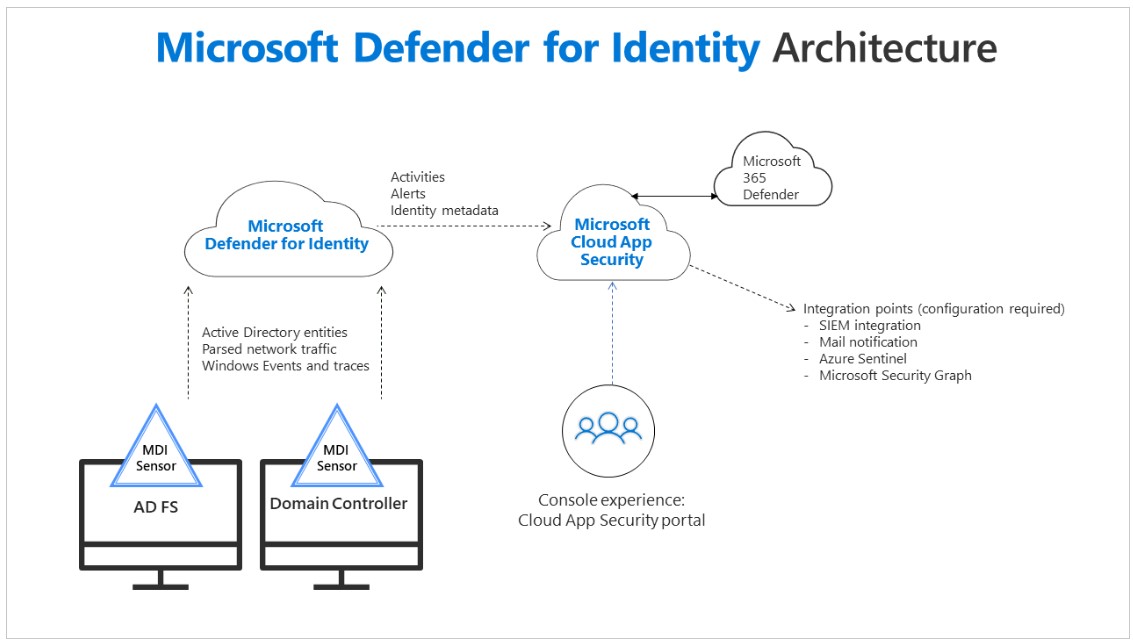
Microsoft Defender for Identity


  • Enables you to identify, detect, and investigate advanced threats in your organization.
  • Allows you to monitor user activities and information.
  • Identify and investigate advanced threats throughout the entire cyber-attack kill chain:
    • Reconnaissance – identify attempts by attackers to gain information.
    • Compromised credentials – any attempts that compromise user credentials shall be detected.
    • Lateral movements – attacks to gain access to sensitive accounts.
    • Domain dominance – the attacker has the credentials to access your domain controller.
    • Exfiltration – unauthorized data transfer.

microsoft defender for identity

Azure Information Protection (AIP)


  • You can protect your documents and emails by applying labels.
  • Labels can be applied:
    • Automatically – administrators
    • Manually – users
    • By combination – recommendations
  • Allows you to track your shared data and revoke access if needed.
  • Configure policies based on the sensitivity of your data.
  • Sharing data with others will be safe, and you are in control of who can edit, view, and print.
  • Labeling content includes:
    • Classification
    • Visual Markings
    • Metadata
  • You can use default labels or custom labels.
  • The default classification labels are:
    • Personal
    • General
    • Confidential
    • Highly Confidential

Azure Key Vault


  • A service that allows you to store tokens, passwords, certificates, and other secrets.
  • You can also create and manage the keys used to encrypt your data.

Features

  • Soft delete allows a deleted key vault and its objects to be retrieved during the retention time you designate.
  • The retention period of a deleted vault is between 7 to 90 days.
  • With soft-delete and purge protection enabled, it will not purge a vault or object in the deleted state until the retention period has expired.
  • You may connect to a key vault via
    • A public endpoint in all networks
    • A public endpoint in selected networks
    • A private endpoint
  • Share access to your applications and resources without revealing your credentials.

Concepts

  • tenant is a representation of an organization.
    • Azure Active Directory allows you to publish multi-tenant applications.
    • Azure Active Directory (B2C) tenant represents a collection of identities.
  • vault owner enables you to create a key vault and set up an auditing log of who has access to secrets and keys.
  • vault consumer can only perform actions on the assets inside the key vault if the vault owner grants the consumer access.
  • A manageable item in Azure is called resource, and resource groups are containers that hold related resources.
  • Service principal gives you control over which resources can be accessed. At the same time, a managed identity eliminates the need for you to create and manage service principals directly since it provides Azure services with an automatically managed identity in Azure AD.
  • You can identify an Azure AD instance within your Azure subscription using a tenant ID.
  • An access policy grants the service principal (user group or application) permissions to perform various operations on Azure Key Vault keys, secrets, and certificates.
    • You can also configure the access policy from a template.
    • With access policy, you can enable access to:
      • Azure Virtual Machines for deployment – this will permit the VMs to retrieve certificates stored as secrets from the key vault.
      • Azure Resource Manager for template deployment – if this option is enabled, the ARM is permitted to retrieve secrets from the key vault.
      • Azure Disk Encryption for volume encryption – grants permission to retrieve secrets from the key vault and unwrap keys.
    • You can select a permission model between vault access policy or Azure RBAC.

Pricing

  • You are charged if the key has been used at least once in the last 30 days (based on the key’s creation date).
  • You are charged for each historical version of a key.

Microsoft Defender for Cloud


  • Manages all the security features of Azure.
  • Detect vulnerabilities, restrict your exposure to threats, and quickly detect and respond to attacks.
  • Secure Score allows you to get continuous assessment and security recommendations.
  • It helps you to detect unusual activities and prevent threats in your PaaS workloads.
  • Protect your virtual machines with configuration and vulnerability management, workload hardening, and server EDR.
  • It also supports advanced monitoring to track and manage compliance & governance.
  • Allows you to protect your resources using free or standard tiers.

Concepts

  • Defender for Cloud displays the overall secure score of your account. The higher the score, the lower the identified risk level.
  • Recommendations help you remediate potential security vulnerabilities in your Azure resources.
  • Security controls help you implement a set of security recommendations. After you remediate all of the recommendations, it will reflect in your overall security score.
  • To help in complying with the security requirement of your organization, you can define a security policy in your workloads.
  • You can quickly investigate the problem and recommendations on how to remediate an attack using security alerts.
  • Microsoft Defender for Cloud just-in-time (JIT) enables you to lock down inbound traffic to your Azure virtual machines.

Pricing

  • With Standard Tier, you are charged
    • Per hour for VMs, app services, SQL database
    • Per transactions for storage and IoT messages
    • Per month for IoT devices
    • Per image for ACR
    • Per vCore/hour for AKS