Saturday, 26 March 2022

Google BigQuery

  • A fully managed data warehouse where you can feed petabyte-scale data sets and run SQL-like queries.

Features

  • Cloud BigQuery is a serverless data warehousing technology.
  • It provides integration with the Apache big data ecosystem allowing Hadoop/Spark and Beam workloads to read or write data directly from BigQuery using Storage API.
  • BigQuery supports a standard SQL dialect that is ANSI:2011 compliant, which reduces the need for code rewrites.
  • Automatically replicates data and keeps a seven-day history of changes which facilitates restoration and data comparison from different times.

Loading data into BigQuery

You must first load your data into BigQuery before you can run queries. To do this you can:

  • Load a set of data records from Cloud Storage or from a local file. The records can be in Avro, CSV, JSON (newline delimited only), ORC, or Parquet format.
  • Export data from Datastore or Firestore and load the exported data into BigQuery.
  • Load data from other Google services, such as
    • Google Ad Manager
    • Google Ads
    • Google Play
    • Cloud Storage
    • Youtube Channel Reports
    • Youtube Content Owner reports
  • Stream data one record at a time using streaming inserts.
  • Write data from a Dataflow pipeline to BigQuery.
  • Use DML statements to perform bulk inserts. Note that BigQuery charges for DML queries. See Data Manipulation Language pricing.

Querying from external data sources

  • BigQuery offers support for querying data directly from:
    • Cloud BigTable
    • Cloud Storage
    • Cloud SQL
  • Supported formats are:
    • Avro
    • CSV
    • JSON (newline delimited only)
    • ORC
    • Parquet
  • To query data on external sources, you have to create external table definition file that contains the schema definition and metadata.

Monitoring

  • BigQuery creates log entries for actions such as creating or deleting a table, purchasing slots, or running a load job.

Pricing

  • On-demand pricing lets you pay only for the storage and compute that you use.
  • Flat-rate pricing with reservations enables high-volume users to choose price for workloads that are predictable.
  • To estimate query costs, it is best practice to acquire the estimated bytes read by using the query validator in Cloud Console or submitting a query job using the API with the dryRun parameter. Use this information in Pricing Calculator to calculate the query cost.

Google Cloud Spanner


  • A fully managed relational database service that scales horizontally with strong consistency.

Features

  • SLA availability up to 99.999% for multi-regional instances with 10x less downtime than four nines.
  • Provides transparent, synchronous replication across region and multi-region configurations.
  • Optimizes performance by automatically sharding the data based on request load and size of data so you can spend less time thinking about scaling your database and more time scaling your business.
  • You can run instances on a regional scope or multi-regional where your database is able to survive regional failure.
  • All tables must have a declared primary key (PK), which can be composed of multiple table columns.
  • Can make schema changes like adding a column or adding an index while serving live traffic with zero downtime.

Pricing

  • Pricing for Cloud Spanner is simple and predictable. You are only charged for:
    • number of nodes in your instance
    • amount of storage that your tables and secondary indexes use (not pre-provisioned)
    • amount of network bandwidth (egress) used
  • Note that there is no additional charge for replication.

Google Cloud SQL


  • A fully managed relational database service. Cloud SQL is available for:
    • MySQL
    • PostgreSQL
    • SQL Server

Features

  • Scale instantly with a single API call as your data grows.
  • Automated and on-demand backups are available.
  • You can restore your database instance to its state at an earlier point in time by enabling binary logging.
  • Data replication between multiple zones with automatic failover.
  • You can perform an analytics job by using BigQuery to directly query your CloudSQL instance.

Networking

  • Can be easily connected to App Engine, Compute Engine, Google Kubernetes Engine, and your workstation.

Security

  • Data is encrypted at rest and in transit and can be encrypted using customer-managed encryption keys.
  • It supports private connectivity with Virtual Private Cloud.
  • Every Cloud SQL instance includes a network firewall to allow you to publicly control network access to your database instances.

Pricing

  • Price varies depending on how much storage, memory, and CPU you provision.
  • Cloud SQL offers per-second billing and database instances.
  • Committed use discounts are offered for continuous use of database instances in a particular region for a one-year or three-year term.

Google Cloud Storage (GCS)


  • An object storage service that stores data within buckets.
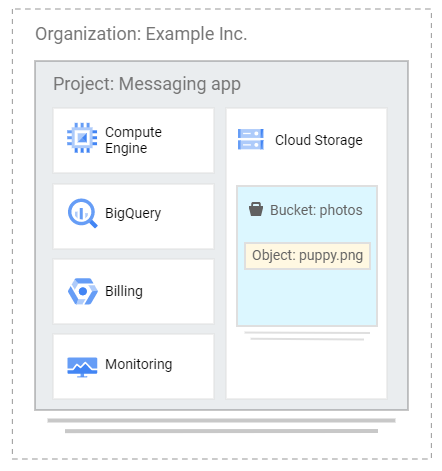
  • Below is a sample Cloud Storage integration:

Buckets

  • The data you upload on Cloud Storage are called objects.
  • An object is an immutable piece of data consisting of a file in any format.
  • You store objects inside containers called buckets.
  • All buckets belong to a project.
  • Each project can have multiple buckets.
  • You can also configure a Cloud Storage bucket to host a static website for a domain you own.

Bucket Configurations

  • Life Cycle Management
    • You can define conditions that trigger data deletion, or transition to a cheaper storage class with object life cycle management.
  • Versioning
    • Continue to store old copies of objects you store when they are deleted or overwritten.
  • Retention Policies
    • Define minimum retention periods that objects must be stored.
  • Object holds
    • Place a hold on an object to prevent deletion.
  • Encryption keys
    • Customer-managed
    • Customer-supplied
  • Access Permissions
    • Access Control List
    • Uniform bucket level access
    • Object and Bucket Level Permissions

Storage Classes

  • Standard Storage
    • Good for hot data that is accessed frequently.
  • Nearline Storage
    • Good for use cases that need to store objects for at least 30 days.
    • Ideal for data that you plan to access once per month or less.
  • Coldline Storage
    • Is a low-cost storage option for storing infrequently accessed data within 90 days.
  • Archive Storage
    • Is the coldest storage among the storage classes.
    • Designed for storing archive data and disaster recovery data that is expected to be accessed once per 365 days or less.

gsutil tool

  • A Python application that enables you to manage your Cloud Storage from the command line.
  • You can use gsutil to perform bucket and object management tasks like:
    • creating and deleting buckets
    • uploading, downloading, and deleting objects
    • listing buckets and objects
    • moving, copying, and renaming objects
    • editing object and bucket ACL
  • gsutil performs all operations using HTTPS and TLS

Uploading objects to GCS

You can send upload requests to Google Cloud Storage via the following methods:

  • Simple Upload – utilize this if the file is small enough to upload again if the connection fails, and if there is no object metadata to send as part of the upload request.
  • Multipart Upload – utilize this if the file is small enough to upload again if the connection fails, and you need to include object metadata as part of the upload request.
  • Resumable Upload – utilize this for a more reliable transfer, which is especially important with large files.
  • Parallel composite uploads – utilize if network and disk speed are not limiting factors. When doing parallel composite upload, a file is divided into up to 32 chunks and uploaded in parallel to temporary objects. The final object is recreated using the temporary objects, and the temporary objects are deleted.
  • Alternatively, for uploading large volumes of data (from hundreds of terabytes up to 1 petabyte), you can utilize the Transfer Appliance. It is a hardware appliance you can use to securely migrate to Google Cloud Platform without disrupting business operations.

Pricing

  • Pricing for Cloud Storage services is based on what you use, including:
    • the amount of data you store,
    • the duration for which you store it,
    • the number of operations you perform on your data,
    • the network resources used when moving or accessing your data.
  • For “cold” storage classes meant to store long-term, infrequently accessed data, there are also charges for retrieving data and early deletion of data.
  • You can require accessors of your data to include a project ID to bill for network charges, operation charges, and retrieval fees.

Google Cloud Filestore


  • Fully managed NFS file servers on Google Cloud for Compute Engine and Google Kubernetes Engine instances
  • Most commonly used for media rendering, data analytics, and managing shared content.

Features

  • Simple, fast, consistent, scalable, and easy to use network-attached storage.
  • You can copy data from Cloud Storage to a filestore fileshare that is mounted on a Compute Engine instance.
  • Data is encrypted at rest and in transit with system-defined keys or customer-supplied keys.
  • Filestore instances are zonal resources that feature in-zone storage redundancy only.
  • It is tightly integrated with Google Kubernetes Engine (GKE) so containers can reference the same shared data.
  • You can easily grow or shrink your Filestore instances via the Google Cloud Console GUI, gcloud command line, or via API-based controls.

Filestore Performance Service Tiers

  • You can pick a performance tier to support your workload requirements.
    • Basic (HDD) – General purpose, test/dev
    • Basic (SSD) – High performance, limited capacity
    • High Scale (SSD) – High performance, large capacity

Pricing

  • Filestore is priced based on the following factors:
    • Service Tier – Basic Standard, Basic Premium, or High Scale SSD
    • Instance Capacity – refers to the storage capacity allocation of your instance
    • Region – the location to which the instance is provisioned
  • There is no charge for ingress traffic to Filestore or egress traffic to a client within the same zone as the Filestore instance. However, there is a charge for egress from Filestore when network traffic leaves the zone of the Filestore instance.

Persistent Disks


  • Are durable network storage devices that you can provision to host your virtual machine instances.

Features

  • Data on each persistent disk is distributed across several physical disks and is designed for high durability. It stores data redundantly to ensure data integrity.
  • Persistent disks are resizable to accommodate larger storage requirements.
  • It can be attached to virtual machines running on Compute Engine (GCE) or Google Kubernetes Engine (GKE).
  • You cannot attach a persistent disk to an instance on another project.
  • Your storage is independent of your virtual machine instances so you can detach or move your PDs to keep your data even after you delete your instances.
  • You can only change the size of a Persistent Disk incrementally.

Zonal and Regional Persistent Disks

You can configure your PD to be zonal or regional.

  • Zonal Disks
    • Are relatively faster than Regional disks and are found in a zone.
  • Regional Disks
    • Provides replication of data between two zones in the same region.
    • Is designed for building robust and highly available systems on Compute Engine.

Persistent Disk Types

  • Standard (pd-standard)
    • Backed by standard hard disk drives (HDD).
    • Efficient and economical for handing sequential read/write operations but they aren’t optimized to handle high rates of random input/output per second (IOPS).
  • Balanced and SSD Disks
    • Backed by solid state drives (SSD)
    • SSD persistent disks are designed for single-digit millisecond latencies

Encryption

  • Data on persistent disks are automatically encrypted at rest and in transit by system defined encryption keys or with customer-supplied keys.
  • To control your data encryption, you can create PDs with your own encryption keys.

Snapshots

  • Persistent disk snapshots can be created to protect against data loss.
  • Snapshots are incremental and take only minutes to create even if you snapshot disks that are attached to running instances.
  • You can set up a snapshot schedule to back up your data on a regular basis.

Pricing

  • Provisioning persistent disks incurs cost based on the following factors:
    • Amount and location of provisioned space per disk
    • Snapshot Storage
    • Network charges for snapshot creation

Friday, 25 March 2022

Local SSD


  • Is a local solid-state drive storage physically attached to the server that hosts your virtual machine (VM) instances.

Features

  • Tightly coupled to a physical server that offers superior performance, very high input/output operations per second (IOPS), and very low latency compared to other block storage options.
  • Each local SSD is 375 GB. Moreover, you can attach a maximum of 24 Local SSD partitions. You can also format and mount several local SSD partitions into one logical volume.
  • Local SSDs are designed for temporary storage use cases which makes them suitable for workloads like:
    • Media Rendering
    • Data Analytics
    • Caches
    • Processing Space
  • Date stored in the GCP infrastructure is automatically encrypted at rest including Local SSDs too.
  • The performance boosts you get from Local SSDs require certain trade-offs like availability, durability, and flexibility. Because of these, the storage is not automatically replicated and all data on the local SSD may be lost if the instance stops for any reason.
  • You are not able to stop and restart an instance that has a local SSD. This means that if you shut down an instance with a local SSD through the guest OS, you cannot restart the instance and all the data stored on the local SSD will be lost.