Wednesday, 29 May 2024

App Configuration


App Configuration

App configuration is an independent store for application configuration settings with security. App Configuration is not tied to any application or a continuous integration platform. It is simply tied to Azure.

It is a very flexible key/value pair store that manages application settings and controls their access centrally. It also simplifies deployment tasks and eases the burden of dealing with permutations of configurations created by multiple applications, dependencies, and environments.

App Configuration also allows adding labels that can be used to maintain values of different environments (such as dev, stage & prod) for a single config property.

Labels are optional fields for a key-value pair, that can be used to differentiate key values with the same key. For instance, a key APIBaseURL with labels staging and prod, is two separate keys in an App Configuration store.

Key Vaults

Key Vaults is a service that allows storing confidential values/secrets. A secret is anything that you want to tightly control access to, such as API keys, passwords, certificates, or cryptographic keys. As an example, we can store API keys, database hostnames, and database passwords on Azure Key Vault.

Azure Key Vault also allows storing third-party/self-signed certificates that can be accessed from the application for third-party authentication/authorization purposes.


How Can We Use App Config and Key Vault Effectively to Store Configuration Data?

We are going to create a configuration for our application which has two config properties:

  • APIBaseURL (value will be stored directly in app config)
  • ClientId (will read its value from key vault as it contains sensitive information)


Steps to Create App Configuration on Azure Portal

Ensure that you have adequate permissions to create Azure app config and key vault on Azure portal.

Search for App Configuration service on Azure portal, select it, and you will be presented with the following screen showing a list of App Configurations that already exist. To create a new one, click the “create” button and make the appropriate selections:
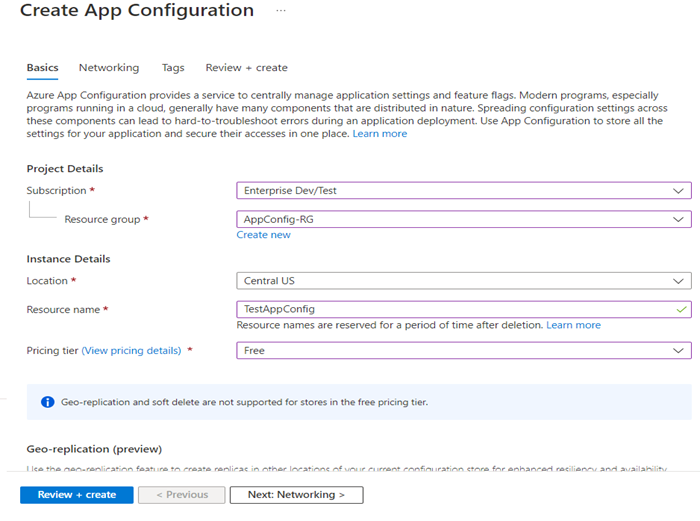
 

Picture3-Feb-21-2023-07-45-13-0021-PM

Next, select the “Review + Create” button.
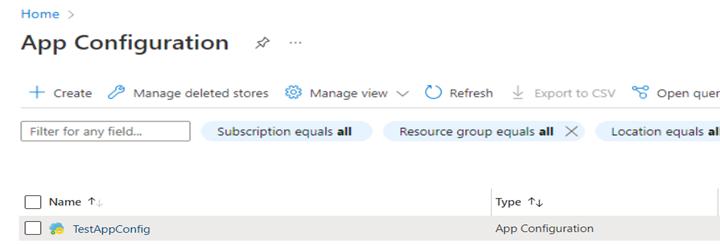
Picture4-Feb-21-2023-07-44-52-8879-PM

Click on TestAppConfig and go to configuration explorer which will allow the creation of new key-value pairs.

Different ways to define key-values on App Configuration:

  • Directly define the values of keys which do not contain sensitive information
  • Read the value from Key Vault in case the value for a key contains sensitive information like password, clientId, client-secret, API Key etc.
  • Import key/values using JSON file containing config data

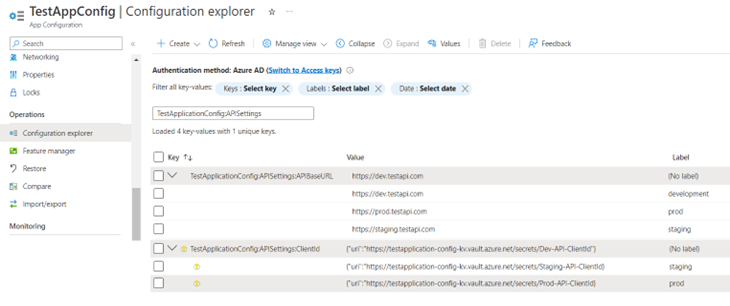
Please see the below screenshot where two configuration keys have been created:

Key with direct value:
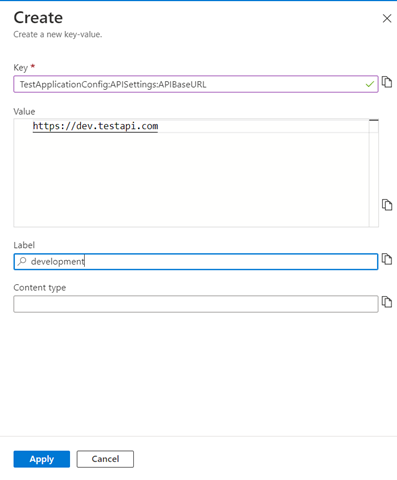
Picture5-Feb-21-2023-07-46-55-2425-PM

Key with value being referenced from key vault secret:
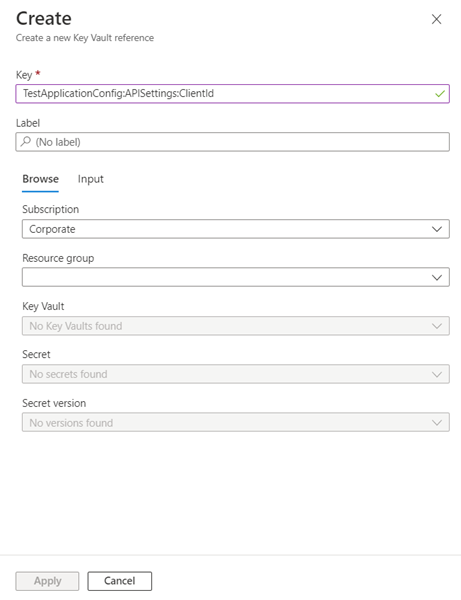
 

Picture6-Feb-21-2023-07-49-56-3859-PM

Picture7-Feb-21-2023-07-50-07-2248-PM

TestApplicationConfig:APISettings:APIBaseURL has four different values for different environments. 

TestApplicationConfig:APISettings:ClientId has three different values that are read from three different secrets of Azure key vault as it contains sensitive information.

C# class for this configuration would look like:

Steps to Create Key Vault on Azure Portal

The following section outlines the creation of secrets on Azure key vault (please see the prior section related to TestApplicationConfig:APISettings:ClientId):

Search & select Key Vault service on Azure portal. You will be presented with a screen showing a list of Key Vaults that already exist and a button that allows you to create a new one.

Click on the create button to create a new key vault. Define the resource group, name of your key vault, and pricing tier:
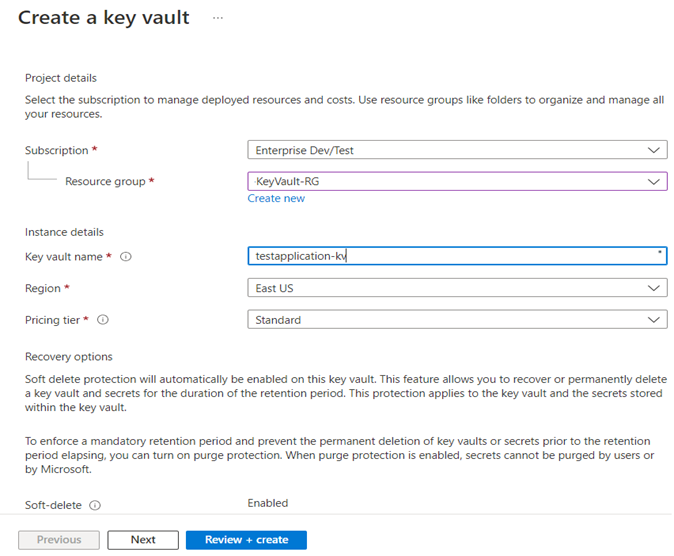
Picture9-Feb-21-2023-07-51-51-0116-PM

Click on the “Review + Create” button.
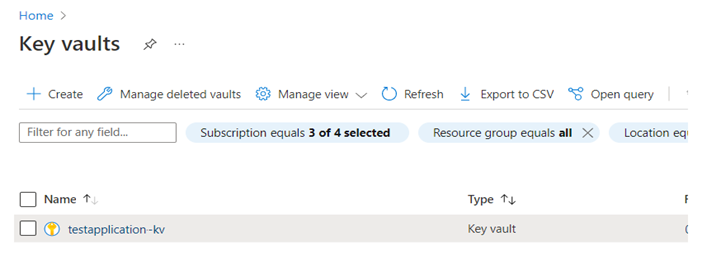
Picture10-Feb-21-2023-07-52-16-5380-PM

Click on testapplication-kv key vault from the list and go to the Secrets section to create and store the secrets of the application. 

To create a new secret, click on Generate/Import button and define the name and value of your secret. You can also set the expiration date of that particular secret by setting an expiration date.

Using Azure App Configuration with AIS

 Using Azure App Configuration with AIS

What is Azure App Configuration?

Contemporary software applications, particularly those operating within a cloud environment, typically consist of numerous distributed components. Dispersing configuration parameters among these components can result in intricate and challenging-to-diagnose issues during the process of deploying the application. Use App Configuration to store all the settings for your application and secure their accesses in one place

  • Azure service to centrally manage application settings and feature flags
  • Store all the settings for your application and secure their access in one place

Bill emphasized the importance of structuring app configuration settings to accommodate various environments, such as development, testing, and production. By leveraging these configurations, developers can seamlessly adapt their applications without worrying about accessing Key Vault.

Why use Azure App Configuration

  • Fully managed service that can be set up in minutes
  • Provide a centralized location for application configuration
  • Centralize management and configuration Information for different environments
  • Reference Information from other services like Azure KeyVault
  • Dynamically change application settings without redeploying or restarting the application

No alt text provided for this image

Bill showcased how templates can indirectly fetch values from Key Vault, simplifying the process and improving security and flexibility in application development.

App Configuration complements the Azure KeyVault, which is used to store application secrets. App Configuration value can refer to secrets stored in Azure KeyVault.

No alt text provided for this image

Bill shared his approach to using one Azure App Configuration for all environments and one Key Vault for each environment.

The session explored practical implementations, specifically integrating Azure App Configuration with Logic Apps. Bill highlighted that using App Configuration with Logic App Consumption resolves limitations with managed identity support in the Key Vault connector. He demonstrated this integration through snippets from a live demo, impressing the audience with its seamless functionality.

Using it with Logic App Consumption

  • A parameter can be replaced with a token replace
  • Can call Azure App Config with HTTP and Managed Identity

No alt text provided for this image

Bill also showed how Logic App Standard provides better support but it is a little convoluted. Logic App parameters can refer to values from the Function Apps app settings which in turn refer to the value stored in the App configuration using the statement @Microsoft.AppConfiguration.

No alt text provided for this image

Use Apps Configuration

The easiest way to add an App Configuration store to your application is through a client library provided by Microsoft. The following methods are available to connect with your application, depending on your chosen language and framework.

No alt text provided for this image

To conclude the session, Bill provided references to GitHub repositories and additional materials, empowering attendees to implement the discussed concepts in their own businesses. The engaging Q&A session showcased the audience's enthusiasm and interest, affirming the value of Azure App Configuration in simplifying application development and deployment workflows.

Key Takeaways

  • A good solution to manage configuration centrally and share across multiple apps. This includes apps running in App Services, as well as other platforms. Support for different configuration providers makes it easy to use.
  • Azure App Configuration service is designed to complement Azure Key Vault not replace it.
  • Dynamically change application settings without the need to redeploy or restart an application.
  • Enhance the security of your applications by maintaining a clear separation between data and code. By storing configuration settings within a hosted environment, you can ensure the security of your data for as long as necessary.
  • To incorporate an App Configuration store into your application, Microsoft offers a convenient client library, making the process straightforward. The library provides various methods to establish a connection between your application and the store, depending on your preferred language and framework

Create an Azure App Configuration store


Create an Azure App Configuration store

Azure App Configuration is an Azure service designed to help you centrally manage your app settings and feature flags. In this quickstart, you learn how to create an App Configuration store and a key-value to the App Configuration store.

Prerequisites

An Azure account with an active subscription. Create one for free.

Create an App Configuration store

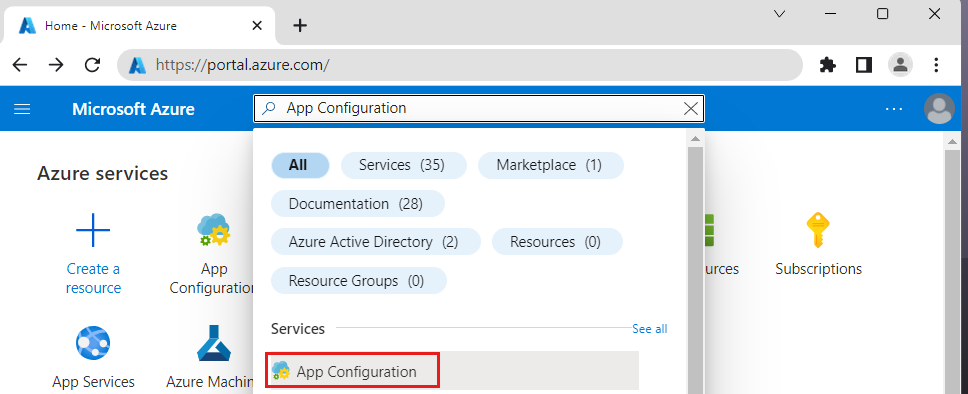
  1. On the Azure portal's homepage, enter App Configuration in the search box at the top and select App Configuration from the search results.

    Screenshot of the Azure portal that shows the App Configuration service in the search bar.

  2. Select Create or Create app configuration.

    Screenshot of the Azure portal that shows the button to launch the creation of an App Configuration store.

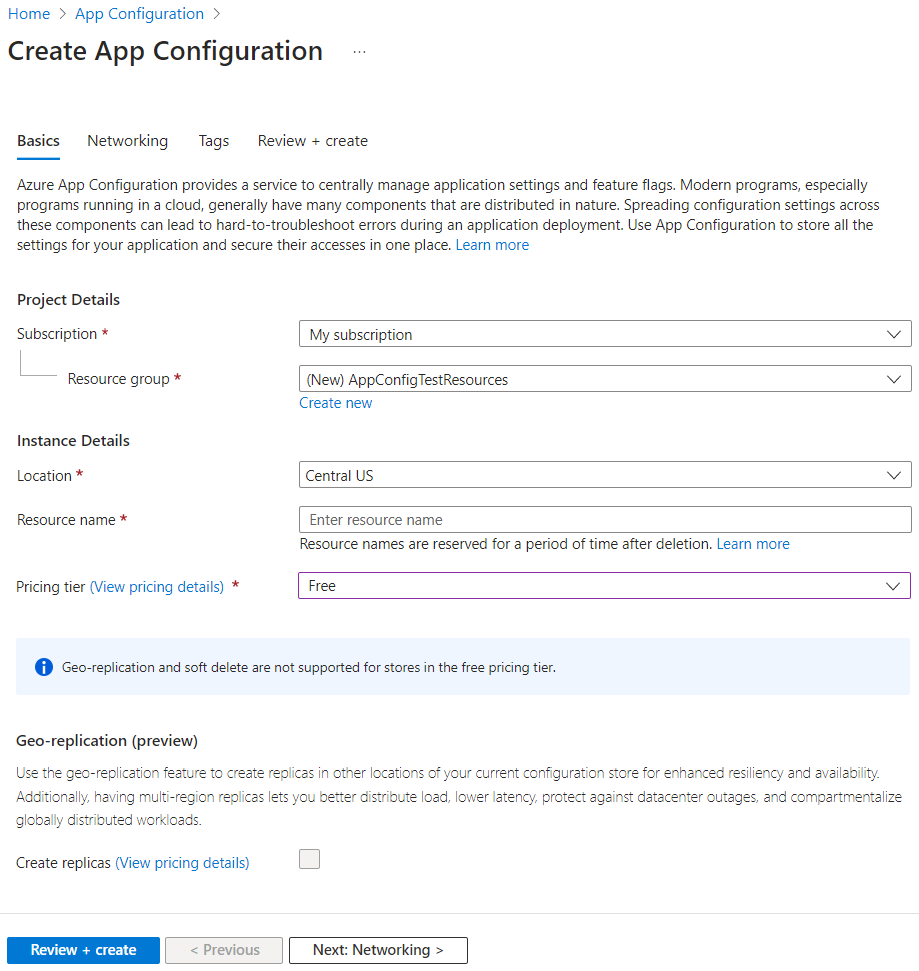
  3. In the Basics tab, enter the following settings:

    SettingSuggested valueDescription
    SubscriptionYour subscriptionSelect the Azure subscription that you want to use to create an App Configuration store. If your account has only one subscription, it's automatically selected and the Subscription list isn't displayed.
    Resource groupAppConfigTestResourcesSelect or create a resource group for your App Configuration store resource. A resource group can be used to organize and manage multiple resources at the same time, such as deleting multiple resources in a single operation by deleting their resource group. For more information, see Manage Azure resource groups by using the Azure portal.
    LocationCentral USUse Location to specify the geographic location in which your app configuration store is hosted. For the best performance, create the resource in the same region as other components of your application.
    Resource nameGlobally unique nameEnter a unique resource name to use for the App Configuration store resource. The name must be a string between 5 and 50 characters and contain only numbers, letters, and the - character. The name can't start or end with the - character.
    Pricing tierFreeSelecting Free. If you select the standard tier, you can also get access to geo-replication and soft-delete features. For more information, see the App Configuration pricing page.

    Screenshot of the Azure portal that shows the basic tab of the creation for with the free tier selected.

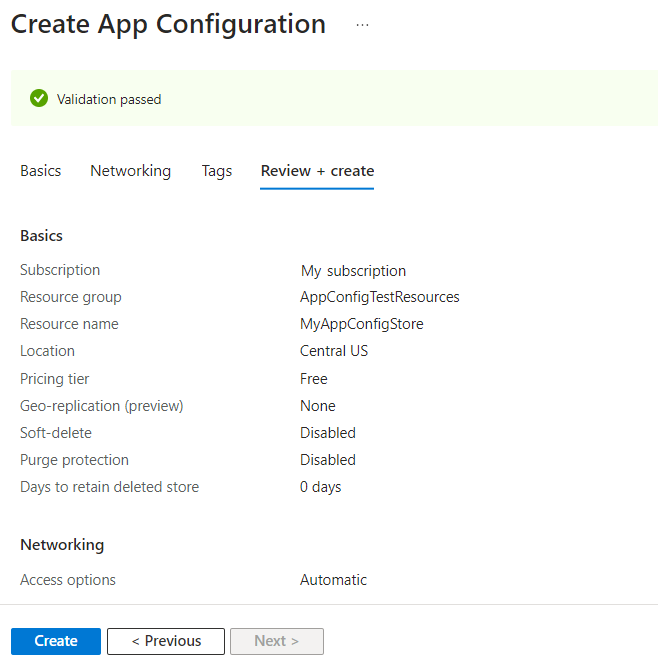
  4. Select Review + create to validate your settings.

    Screenshot of the Azure portal that shows the configuration settings in the Review + create tab.

  5. Select Create. The deployment might take a few minutes.

  6. After the deployment finishes, go to the App Configuration resource. Select Settings > Access keys. Make a note of the primary read-only key connection string. You'll use this connection string later to configure your application to communicate with the App Configuration store that you created.

If you're following another tutorial to use the App Configuration store, you can go back to your original tutorial as the store should be ready. To continue with this tutorial, follow the steps below.

Create a key-value

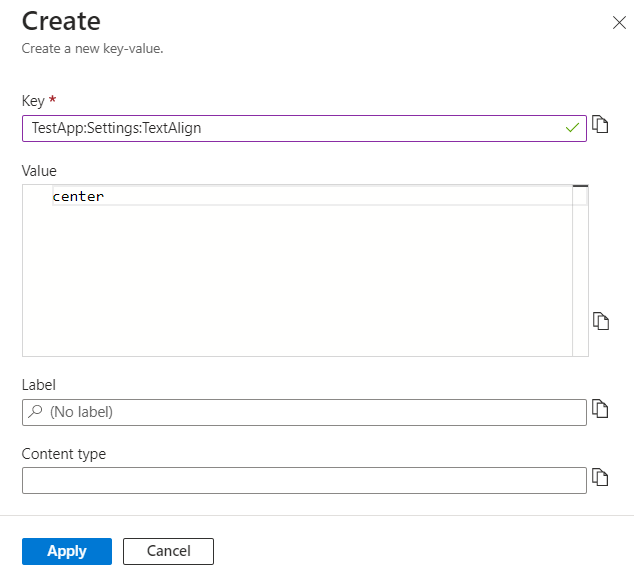
  1. Select Operations > Configuration explorer > Create > Key-value to add a key-value to a store. For example:

    KeyValue
    TestApp:Settings:TextAligncenter
  2. Leave Label and Content Type with their default values, then select Apply. For more information about labels and content types, go to Keys and values.

    Screenshot of the Azure portal that shows the configuration settings to create a key-value.