Wednesday, 29 May 2024

Get started with deploying and upgrading applications on your local cluster


Get started with deploying and upgrading applications on your local cluster

A Service Fabric cluster represents a set of hardware resources that you can deploy applications to. Typically, a cluster is made up of anywhere from 5 to many 1000s of machines, but the Service Fabric SDK includes a cluster configuration that can run on a single machine.

It is important to understand that the Service Fabric local cluster is not an emulator or simulator. It runs the same platform code found on multi-machine clusters. The only difference is that it runs the platform processes normally spread across five machines on one.

The SDK provides two ways to setup a local cluster: a Windows PowerShell script and the Local Cluster Manager system tray app. In this tutorial, we will use the PowerShell script.

[AZURE.NOTE] If you have already created a local cluster by deploying an application from Visual Studio, you can skip this section.

  1. Launch a new PowerShell window as an administrator.

  2. Run the cluster setup script from the SDK folder:

    & "$ENV:ProgramFiles\Microsoft SDKs\Service Fabric\ClusterSetup\DevClusterSetup.ps1"

    Cluster setup will take a few moments, after which you should see output that looks something like this:

    Cluster setup output

    You are now ready to try deploying an application to your cluster.

Deploy an application

The Service Fabric SDK includes a rich set of frameworks and developer tooling for creating applications. If you are interested in learning how to create applications in Visual Studio, see Creating your first application in Visual Studio. In this tutorial, we will use an existing sample application (called WordCount) so that we can focus on the management aspects of the platform, including deployment, monitoring, and upgrade.

  1. Launch a new PowerShell window as an administrator.

  2. Import the Service Fabric SDK PowerShell module.

    Import-Module "$ENV:ProgramFiles\Microsoft SDKs\Service Fabric\Tools\PSModule\ServiceFabricSDK\ServiceFabricSDK.psm1"
  3. Create a directory to store the application that you will download and deploy, such as c:\ServiceFabric.

    mkdir c:\ServiceFabric\
    cd c:\ServiceFabric\
  4. Download the WordCount application from here to the location you created.

  5. Connect to the local cluster:

    Connect-ServiceFabricCluster localhost:19000
  6. Invoke the SDK's deployment command to create a new application, providing a name and a path to the application package.

Publish-NewServiceFabricApplication -ApplicationPackagePath c:\ServiceFabric\WordCountV1.sfpkg -ApplicationName "fabric:/WordCount" ```

If all goes well, you should see output like the following:

![Deploy an application to the local cluster][deploy-app-to-local-cluster]
  1. To see the application in action, launch the browser and navigate to http://localhost:8081/wordcount/index. You should see something like this:

    Deployed application UI

    The WordCount application is very simple. It includes client-side JavaScript code to generate random five-character "words", which are then relayed to the application via an ASP.NET WebAPI. A stateful service keeps track of the number of words counted, partitioned based on the first character of the word. The application that we deployed contains a four partitions, so words beginning with A through G are stored in the first partition, H through N are stored in the second partition, and so on.

View application details and status

With the application deployed, let's look at some of the app details in PowerShell.

  1. Query all deployed applications on the cluster:

    Get-ServiceFabricApplication

    Assuming that you have only deployed the WordCount app, you will see something like this:

    Query all deployed applications in PowerShell

  2. Go to the next level by querying the set of services included in the WordCount application.

    Get-ServiceFabricService -ApplicationName 'fabric:/WordCount'

    List services for the applicatin in PowerShell

    Note that the application is made up of two services, the web front-end and the stateful service that manages the words.

  3. Finally, take a look at the list of partitions for the WordCountService:

    View the service partitions in PowerShell

    The set of commands you just used, like all Service Fabric PowerShell commands, are available for any cluster that you might connect to, local or remote.

    For a more visual way to interact with the cluster, you can use the web-based Service Fabric Explorer tool by navigating to http://localhost:19080/Explorer in the browser.

    View application details in Service Fabric Explorer

    [AZURE.NOTE] To learn more about Service Fabric Explorer, see Visualizing your cluster with Service Fabric Explorer

Upgrade an application

Service Fabric provides no-downtime upgrades by monitoring the health of the application as it rolls out across the cluster. Let's perform a simple upgrade of the WordCount application.

The new version of the application will now only count words that begin with a vowel. As the upgrade rolls out, we will see two changes in the application's behavior. First, the rate at which the count grows should slow, since fewer words are being counted. Second, since the first partition has two vowels (A and E) and all others contain only one each, its count should eventually start to outpace the others.

  1. Download the v2 package from here to the same location where you downloaded the v1 package.

  2. Return to your PowerShell window and use the SDK's upgrade command to register the new version in the cluster and begin upgrading fabric:/WordCount.

    Publish-UpgradedServiceFabricApplication -ApplicationPackagePath C:\ServiceFabric\WordCountV2.sfpkg -ApplicationName "fabric:/WordCount" -UpgradeParameters @{"FailureAction"="Rollback"; "UpgradeReplicaSetCheckTimeout"=1; "Monitored"=$true; "Force"=$true}

    You should see output in PowerShell that looks something like this as the upgrade begins.

    Upgrade progress in PowerShell

  3. While the upgrade is proceeding, you may find it easier to monitor its status from Service Fabric Explorer. Launch a browser window and navigate to http://localhost:19080/Explorer. Click Applications in the tree on the left and then choose Upgrades in Progress.

    Upgrade progress in Service Fabric Explorer

    Note that the Upgrade Progress indicator represents the state of the upgrade within the upgrade domains of your cluster. As the upgrade proceeds through each domain, health checks are performed to ensure that the application is behaving properly before proceeding.

  4. If you rerun the earlier query for the set of services included in the fabric:/WordCount application, you will notice that while the version of the WordCountService changed, the version of the WordCountWebService did not:

    Get-ServiceFabricService -ApplicationName 'fabric:/WordCount'

    Query application services after upgrade

    This highlights how Service Fabric manages application upgrades, which is to only touch the set of services (or code/configuration packages within those services) that have changed, making the process of upgrading faster and more reliable.

  5. Finally, return to the browser to observe the behavior of the new application version. As expected, the count progresses more slowly and the first partition ends up with slightly more of the volume.

    View the new version of the application in the browser

Service Fabric Overview


Service Fabric Overview

Service Fabric is an application hosting platform that supports different forms of packaging and managing services, including, but not limited to containers.

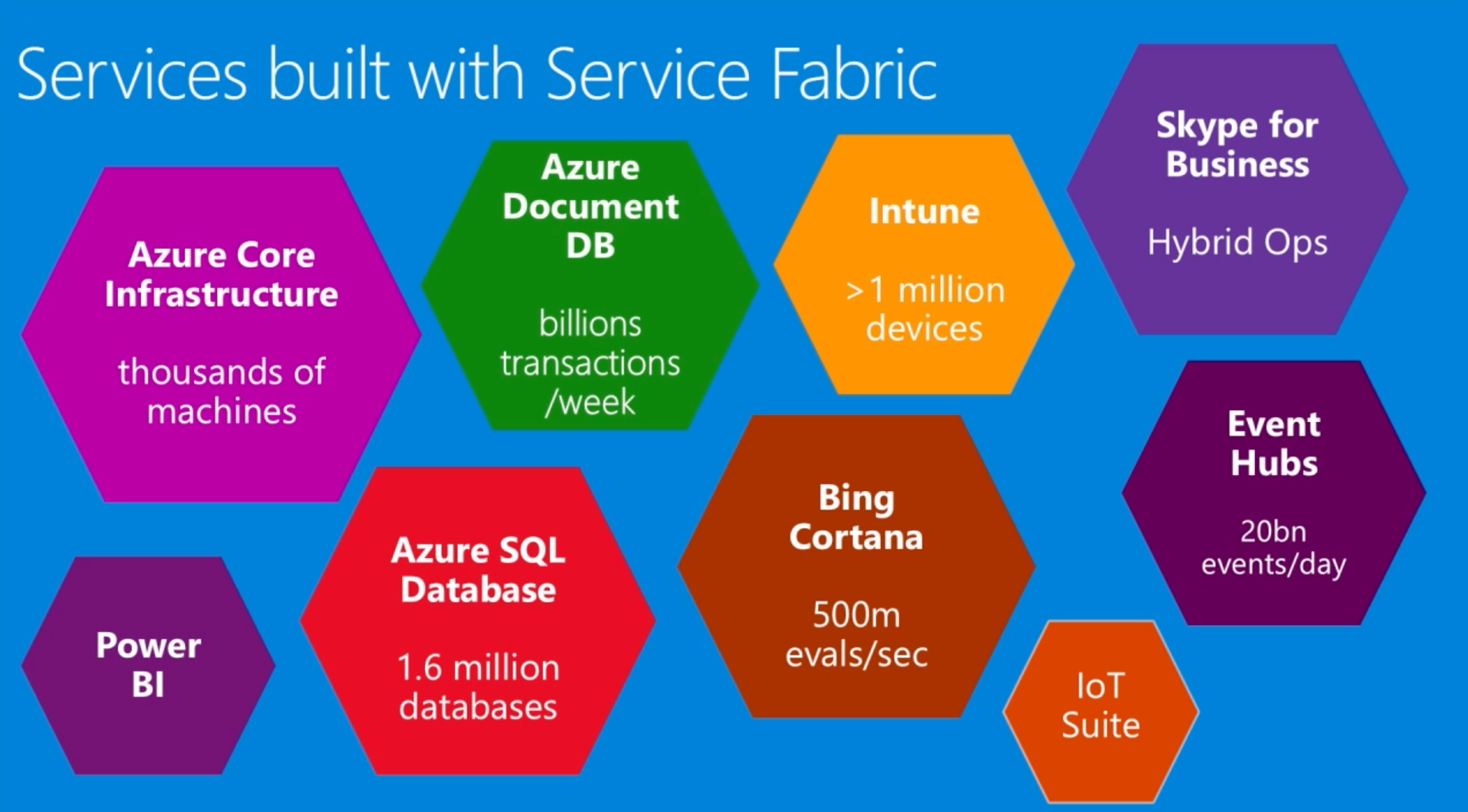
Microsoft had previously published documentation that Service Fabric is being used in many core Azure services:

Services powered by Service Fabric shown in the diagram include Azure Core Infrastructure, Azure Document DB, Intune, Skype for Business, Event Hubs, Bing Cortana, Azure SQL Database, Power BI, IoT Suite
Figure 1. A partial list of services powered by Service Fabric (as of 2019).

In 2016, in light of Service Fabric's success in internal environments, Microsoft released Azure Service Fabric as a platform as a service, allowing customers to create and manage their own dedicated Service Fabric clusters in Azure Cloud. It’s widely used by enterprises across a variety of sectors including government, media, automotivefashiontransportation and multinational conglomerates.

Service Fabric Architecture

A general understanding of the basic architecture of Service Fabric is required in order to understand the full impact of FabricScape, so we’ll start with a quick overview of Service Fabric architecture.

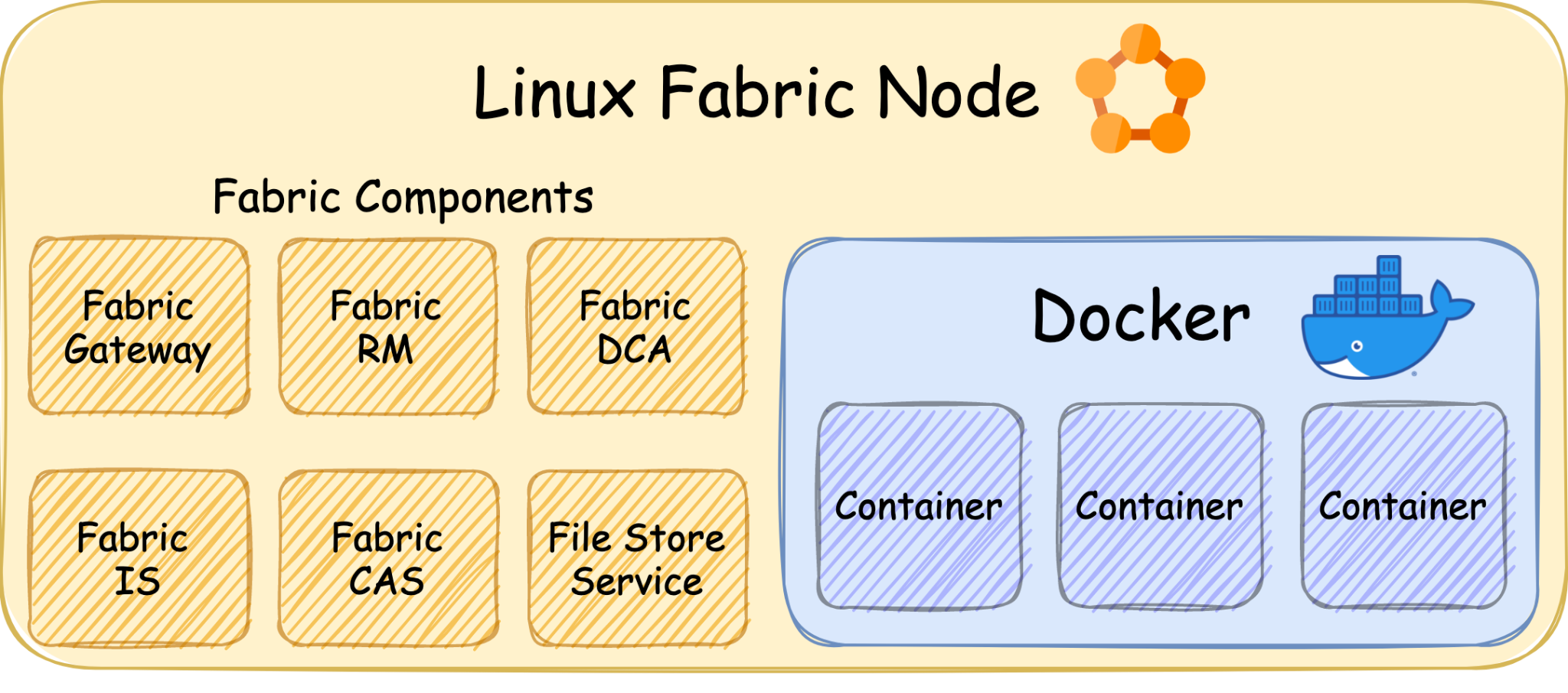
A Service Fabric cluster consists of many nodes as each one runs a container engine that executes the desired containerized applications, just like Kubernetes. It supports Linux and Windows nodes and uses Docker on both while supporting Hyper-V isolation mode in Windows nodes for maximum isolation. When deploying an application into a Service Fabric cluster, Service Fabric will deploy the application as containers according to the application manifest.

Under the hood every node runs multiple components, allowing multiple nodes to work in synergy and form a reliable and distributed cluster. There is almost no public documentation about these components, but Microsoft released Service Fabric version 6.4 source code in 2018, and that allowed the public to read the code and understand the components' purposes and operations.

Linux Fabric Node: Fabric Components - Fabric Gateway, Fabric RM, Fabric DCA, Fabric IS, Fabric CAS, File Store Service. These are shown in the diagram beside several Docker containers.
Figure 2. Service Fabric Linux node example.

The Vulnerability

Service Fabric supports deploying applications as containers, and during each container initialization, a new log directory is created and mounted into each container with read and write permission. All of those directories are centralized in one path on every node. For example, in Azure Service Fabric offering, those directories are at /mnt/sfroot/log/Containers.

One of Service Fabric's components is the Data Collection Agent (DCA). Among other things, it is responsible for collecting the logs from those directories to be processed later. In order to access the directories, it needs high privileges and therefore runs as root on every node.

At the same time, it handles files that could be modified by containers. Thus, exploiting a vulnerability in the agent's mechanism that handles these files could result in a container escape and gaining root on the node. This could happen, for example, if the user runs a malicious container or package, or if a container is taken over by an attacker.

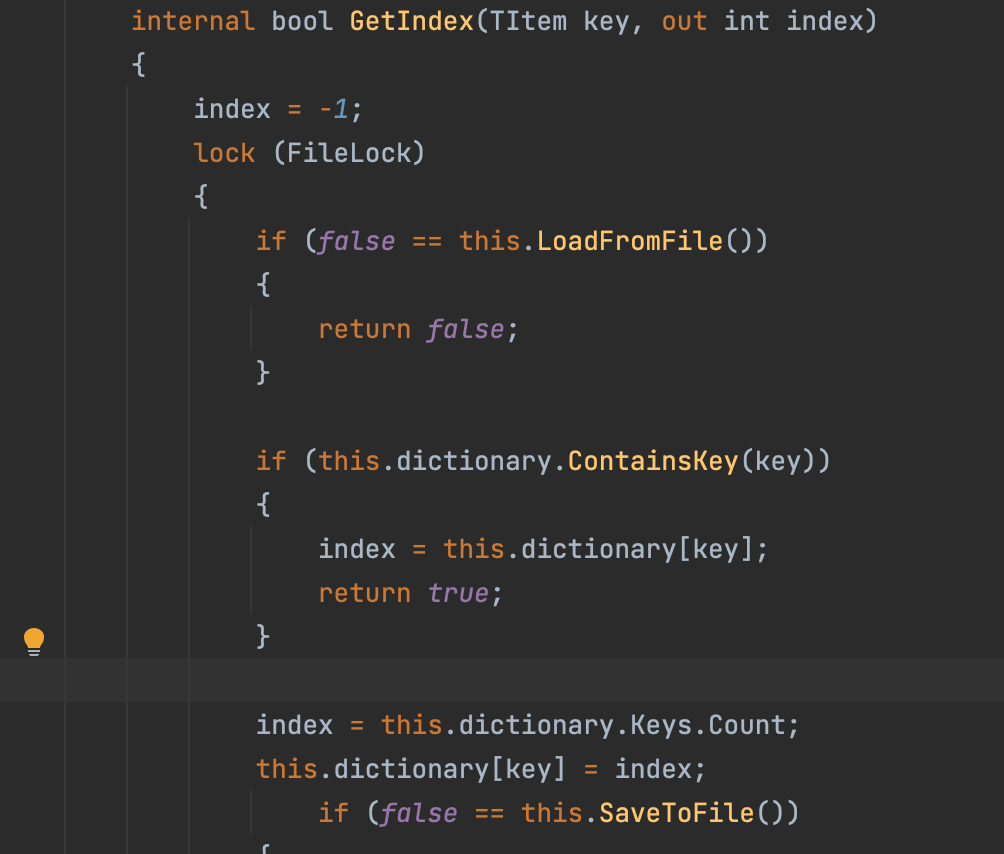
By digging into DCA's old source code, we noticed a potential race-conditioned arbitrary write in the function GetIndex (PersistedIndex.cs:48).

This function reads a file, checks that the content is in the expected format, modifies some of the content and overwrites the file with the new content.

In order to do so, it uses two sub-functions:

  • LoadFromFile – reads the file.
  • SaveToFile – writes the new data to the file.
Code shown begins with "internal bool GetIndex(TItem key, out int index)"
Figure 3. GetIndex function.

This functionality results in a symlink race. An attacker in a compromised container could place malicious content in the file that LoadFromFile reads. While it continues to parse the file, the attacker could overwrite the file with a symlink to a desirable path so that later SaveToFile will follow the symlink and write the malicious content to that path.

As DCA runs as root on the node file system, it will follow the symlink and overwrite files in the node file system.

Exploitation of CVE-2022-30137

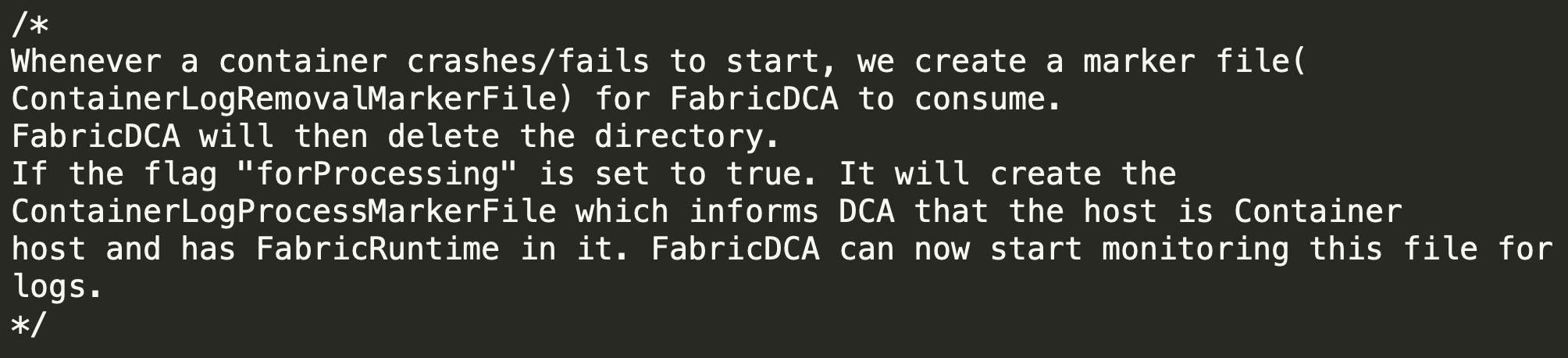
In order to exploit the issue, an attacker needs to trigger DCA to run the vulnerable function on a file that it controls. DCA monitors the creation of specific filenames in the log directories we mentioned above, and executes different functionality for each file. One of those files is ProcessContainerLog.txt.

"Whenever a container crashes/fails to start, we create a marker file (ContainerLogRemovalMarkerFile) for FabricDCA to consume. FabricDCA will then delete the directory. If the flag "forProcessing" is set to true. It will create the ContainerLogProcessMarkerFile which informs DCA that the host is Container host and has FabricRuntime in it. FabricDCA can now start monitoring this file for logs."
Figure 4. ProcessContainerLog documentation in the code.

When DCA identifies that this file was created, it executes a function that eventually runs GetIndex numerous times on paths inside the log directory, which the container can modify.

Code snippet begins with "private void ContainerLogFolderProcessingStartup(string containerLogFolderFullPath)"
Figure 5. Monitoring ProcessContainerLog.

This means that a malicious container could trigger the execution of GetIndex on a file that it controls and try to beat the race condition in order to overwrite any path on the node filesystem.

In order to beat it consistently, we changed the malicious file to weigh 10 MB, so that it will take LoadFromFile a considerable amount of time to parse it, giving us sufficient time to overwrite it with a symlink and beat the race every single time.

At this point, we were able to exploit GetIndex from the context of the container and overwrite any file on the node.

While this behavior can be observed on both Linux containers and Windows containers, it is only exploitable in Linux containers because in Windows containers unprivileged actors cannot create symlinks in that environment.

From now on, we will focus on the exploitation of a Linux node (Ubuntu 18.04) in order to gain code execution on the node.

Gaining Code Execution on the Node

Gaining code execution on a machine using a privileged arbitrary write vulnerability is a trivial task that can be accomplished using many techniques such as adding malicious ssh keysadding a malicious user or installing a backdoor by overwriting benign binaries.

None of these techniques is applicable in this case since the write primitive to the node filesystem is weak because of two reasons:

  1. GetIndex modifies internal Service Fabric files and therefore verifies that the file (payload content) is in the right internal format before continuing to SaveToFile.
  2. The overwritten file on the node file system doesn't have execution permissions.
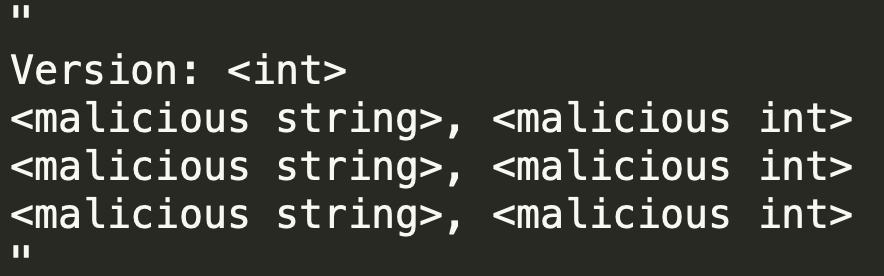
"Version: <int> - <malicious string>, <malicious int>," etc
Figure 6. Example of the internal format.

After some digging, we figured out that the format is very similar to the format of files that contain environment variables.

An example showing what a malicious file involved with FabricScape might look like
Figure 7. Malicious file example.

We choose to use /etc/environment for the exploitation as it contains environment variables specifying the basic environment variables for new shells but can be used by other programs. After some research, we found out that every executed job in the Linux task scheduler (cron) imports this file, and luckily, there is a job that is executed every minute by root on every node, meaning we could inject malicious environment variables into new processes that run as root on the node.

After digging deeper, we found that having jobs on the scheduler is not necessary for exploitation since cron executes an internal hourly job as root, which could be exploited.

This shows a snippet of the cron job and related comments
Figure 8. The cron job that is executed every minute.

In order to gain code execution, we used a technique called dynamic linker hijacking. We abused the LD_PRELOAD environment variable. During the initialization of a new process, the linker loads the shared object that this variable points to, and with that, we inject shared objects to the privileged cron jobs on the node.

We wrote a dummy shared object with a function that initiates a reverse shell and added a construction attribute so that when the shared object is loaded, it will initiate a reverse shell automatically. We compiled the shared object and copied it to the log directory in the container so that we could point LD_PRELOAD to the object path.

One minute after exploitation, we got a reverse shell in the context of root on the node.

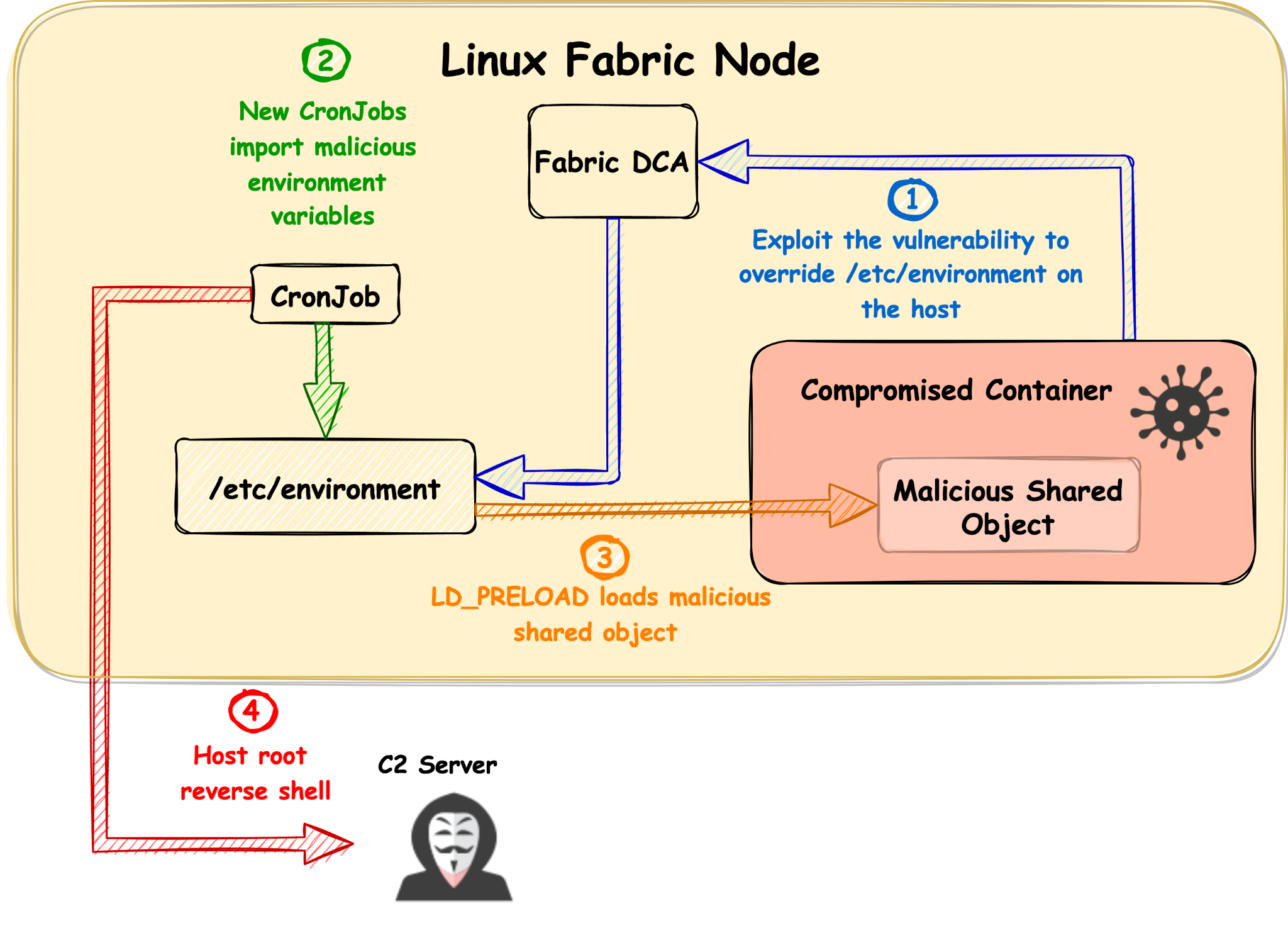
Linux Fabric Node. Exploitation flow is illustrated step by step. 1) Exploit the vulnerability to overwrite /etc/environment on the host, 2) New CronJobs import malicious environment variables, 3) LD_PRELOAD loads malicious shared object, 4) Host root reverse shell
Figure 9. Exploitation flow.

We tested this exploitation successfully on the Azure Service Fabric offering using the latest version available at that time (8.2.1124.1), on both Ubuntu 16.04 and 18.04. We were able to beat the race condition consistently and successfully break out and execute code on the node every single time.

Cluster Takeover

Microsoft provides users an easy way to manage and interact with their Service Fabric clusters by using the sfctl CLI tool.

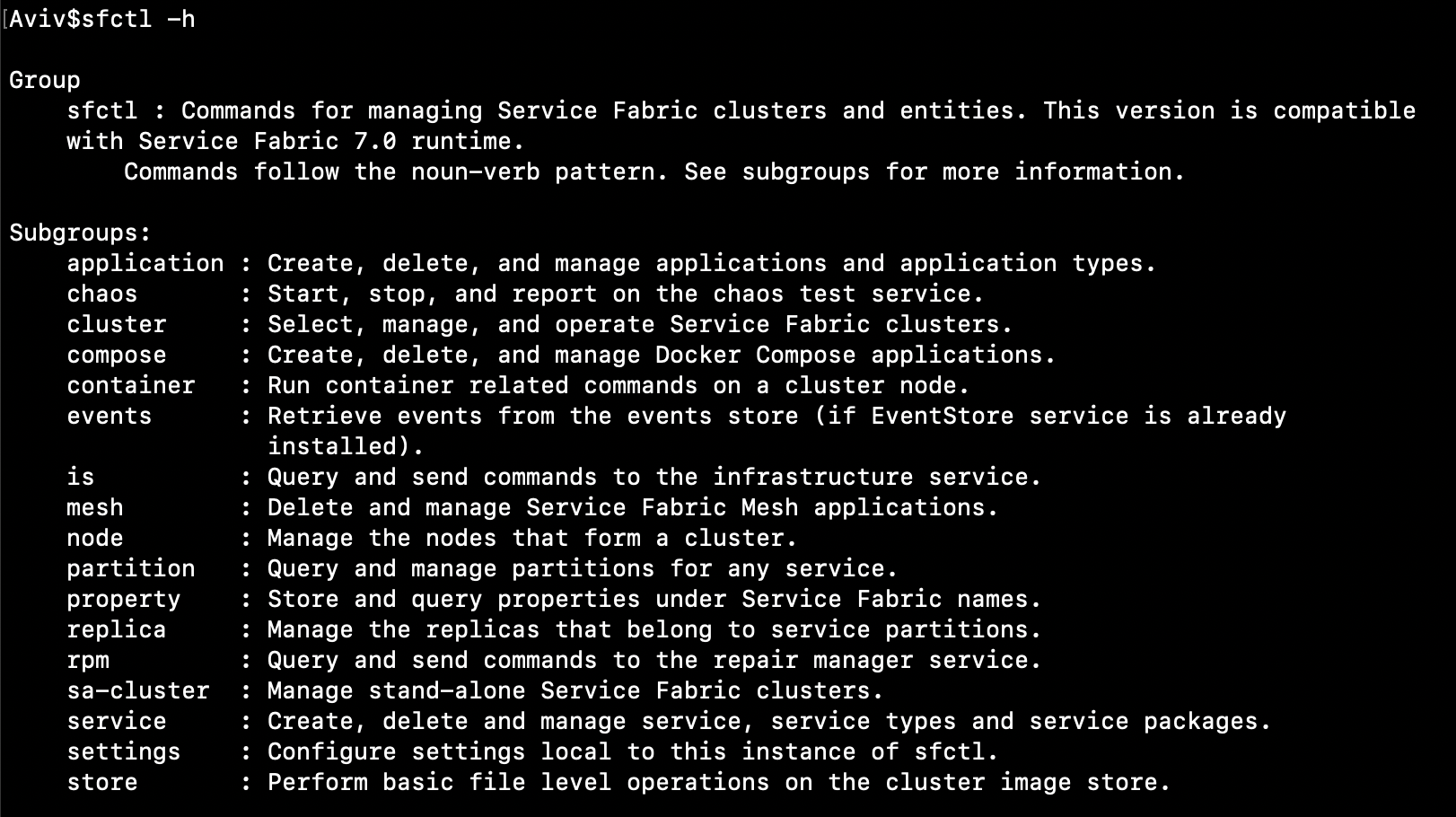
A list of Sfctl commands, "commands for managing ServiceFabric clusters and entities. This version is compatible with Service Fabric 7.0 runtime. Commands follow the noun-verb patters. Commands include subgroups such as application, chaos, cluster, etc.
Figure 10. Sfctl subcommands.

In order to interact and manage a cluster, users need to provide sfctl two arguments:

  1. The cluster endpoint address.
  2. A private certificate.

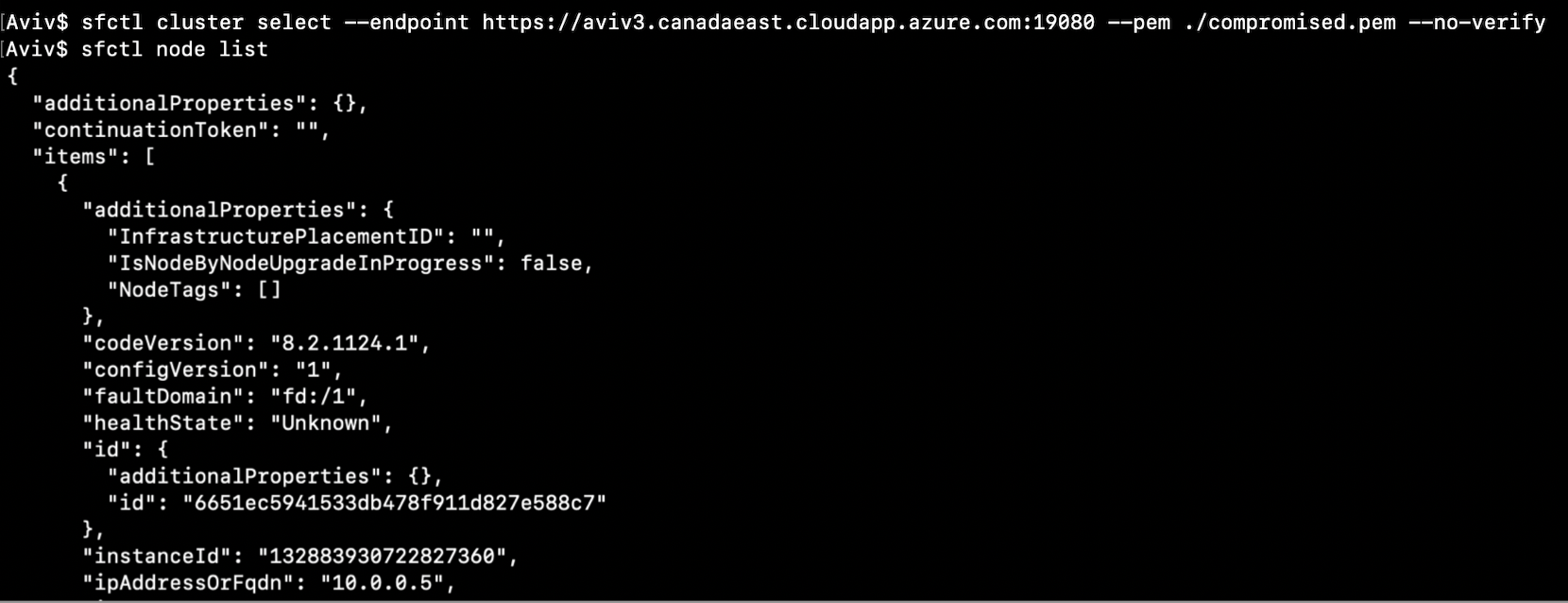
When executing a command, sfctl sends requests to a REST API in the cluster and uses the certificate for authentication. This API can perform many functionalities and provides a way to manage the cluster remotely. It listens on port 19080 by default in the Azure Service Fabric offering and is open to the internet so that users would be able to access it.

Code snippet begins with "sfctl cluster select"
Figure 11. Selecting a cluster using sfctl.

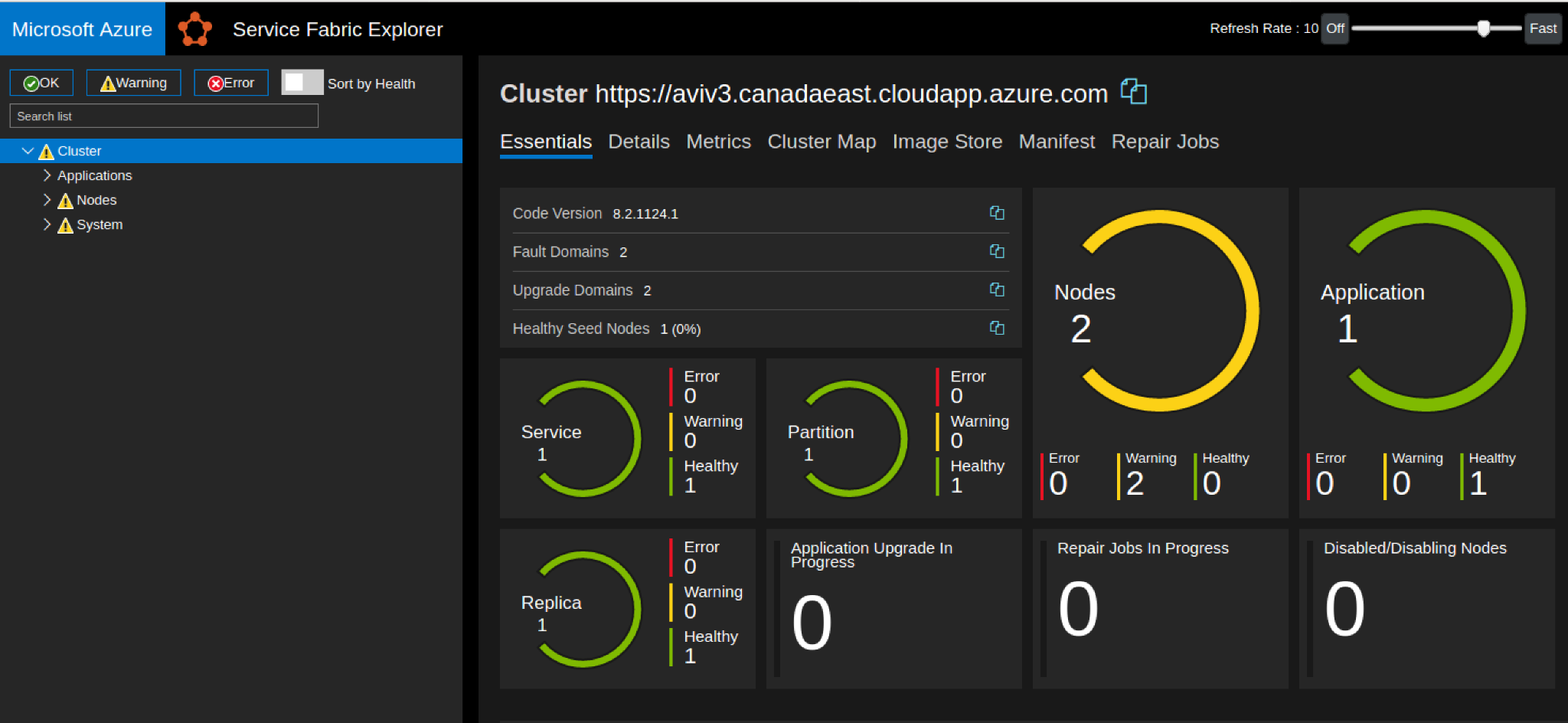
Besides the API, this endpoint has a graphical interface that can be accessed by browsers if the private certificate is applied. This interface is called Service Fabric Explorer, and it is used as a graphical way to manage and analyze the cluster.

A screenshot of the interface called Service Fabric Explorer that is included in Microsoft Azure
Figure 12. Service Fabric Explorer index page.

After gaining root privileges on the node by exploiting CVE-2022-30137, we explored the file system and found the directory /var/lib/waagent/ contains sensitive files, including the certificate that controls the whole cluster.

By applying the compromised certificate, we were able to authenticate to any of the REST API endpoints (and the load balancer) and send requests to trigger functionalities in the cluster.

We were able to use the certificate to run sfctl and manage the cluster, or even browse to the Service Fabric Explorer.

This is the code snipped used to test the compromised certificate after gaining root privileges to the node by exploiting FabricScape
Figure 13. Testing the compromised certificate.

Broader Impact of FabricScape

Microsoft does not publicly disclose what offerings are powered by Service Fabric but does provide a partial list as shown in Figure 1.

This means that if a malicious actor gains control over a container in Service Fabric, it would be possible to compromise the whole cluster as demonstrated above.

Limitations

A Service Fabric cluster is single-tenant by design, and hosted applications are considered trusted. They are therefore able to access the Service Fabric runtime data by default. This access allows the applications to read data regarding their Service Fabric environment and write logs to specific locations. In order to exploit FabricScape, the compromised container must have runtime access because that is necessary for the logs directory to be accessible. If developers consider their applications as untrusted or if the cluster is multitenant, this access can be disabled for each application on the cluster separately by modifying each application manifest and setting RemoveServiceFabricRuntimeAccess to true.

Other than our successful exploitation in Azure Service Fabric, we tested Azure Container Instances, Azure PostgreSQL and Azure Functions. All of these services can be deployed in a serverless plan and are powered by multitenant Service Fabric clusters.

We could not exploit FabricScape over those services since Azure disabled the runtime access on those services.

Disclosure and Mitigations

We disclosed the vulnerability, including a full operational exploit, to Microsoft on Jan. 30, 2022.

Microsoft released a fix for the issue on June 14, 2022.

We advise that customers running Azure Service Fabric without automatic updates enabled should upgrade their Linux clusters to the most recent Service Fabric release. Customers whose Linux clusters are automatically updated do not need to take further action.

Customers that use other Azure offerings that are based on managed Service Fabric clusters are safe as Microsoft has updated its software.