Saturday, 26 March 2022

Google BigQuery

 Google Cloud BigQuery

  • A fully managed data warehouse where you can feed petabyte-scale data sets and run SQL-like queries.

Features

  • Cloud BigQuery is a serverless data warehousing technology.
  • It provides integration with the Apache big data ecosystem allowing Hadoop/Spark and Beam workloads to read or write data directly from BigQuery using Storage API.
  • BigQuery supports a standard SQL dialect that is ANSI:2011 compliant, which reduces the need for code rewrites.
  • Automatically replicates data and keeps a seven-day history of changes which facilitates restoration and data comparison from different times.

Loading data into BigQuery

You must first load your data into BigQuery before you can run queries. To do this you can:

  • Load a set of data records from Cloud Storage or from a local file. The records can be in Avro, CSV, JSON (newline delimited only), ORC, or Parquet format.
  • Export data from Datastore or Firestore and load the exported data into BigQuery.
  • Load data from other Google services, such as
    • Google Ad Manager
    • Google Ads
    • Google Play
    • Cloud Storage
    • Youtube Channel Reports
    • Youtube Content Owner reports
  • Stream data one record at a time using streaming inserts.
  • Write data from a Dataflow pipeline to BigQuery.
  • Use DML statements to perform bulk inserts. Note that BigQuery charges for DML queries. See Data Manipulation Language pricing.

Querying from external data sources

  • BigQuery offers support for querying data directly from:
    • Cloud BigTable
    • Cloud Storage
    • Cloud SQL
  • Supported formats are:
    • Avro
    • CSV
    • JSON (newline delimited only)
    • ORC
    • Parquet
  • To query data on external sources, you have to create external table definition file that contains the schema definition and metadata.

Monitoring

  • BigQuery creates log entries for actions such as creating or deleting a table, purchasing slots, or running a load job.

Pricing

  • On-demand pricing lets you pay only for the storage and compute that you use.
  • Flat-rate pricing with reservations enables high-volume users to choose price for workloads that are predictable.
  • To estimate query costs, it is best practice to acquire the estimated bytes read by using the query validator in Cloud Console or submitting a query job using the API with the dryRun parameter. Use this information in Pricing Calculator to calculate the query cost.

Google Cloud Pub/Sub


  • Cloud Pub/Sub is a fully-managed real-time messaging service for event driven systems that allows you to send and receive messages between independent applications.

Features

  • Capable of global message routing to simplify multi-region systems.
  • Synchronous, cross-zone message replication and per-message receipt tracking ensure at-least-once delivery at any scale. Pub/Sub delivers each message at least once, so the Pub/Sub service might redeliver messages.
  • You can declare independent quota and billing for publishers and subscribers.
  • Cloud Pub/Sub doesn’t have shards or partitions. You just need to set your quota, publish, and consume.

Key Concepts

  • Topic
    • It is a named resource to which publishers send messages.
  • Subscription
    • Is a named resource representing the stream of messages from a specific topic, to be sent to the subscribing application.
  • Message
    • The combination of data and attributes that a publisher sends to a topic and is eventually sent to subscribers.
  • Message attribute
    • A key-value pair that a publisher can define for a message.

Publisher-subscriber relationships

  • A publisher application creates and sends messages to a topic.
  • Subscriber applications then create a subscription to a topic to receive messages from the topic.
  • Communication can be
    • one-to-many
    • many-to-one
    • many-to-many

Pricing

  • Pub/Sub pricing is calculated based upon monthly data volumes:
    • Message ingestion and delivery
    • Snapshots and retained acknowledged messages
  • The first 10 GB of data per month is offered free of charge.

Google Cloud Secret Manager


  • Secret Manager is a secure and convenient method to store API keys, passwords, certificates, and other sensitive data.
  • It provides a central place as the source of truth to manage, access, and audit secrets across Google Cloud.

Features

  • Secret names are project-global resources, but secret data is stored in regions.
  • You can choose specific regions in which to store your secrets.
  • Secret data is immutable and most operations take place on secret versions.
  • Secret Manager integrates with IAM.
  • Every interaction with Secret Manager generates an audit entry with Cloud Logging enabled to help you detect system anomalies.
  • You can enable context-aware access to Secret Manager from hybrid environments using VPC Service Controls.

Pricing

  • Secret Manager charges for operations and active secret versions.
  • A version is considered active if it is in the ENABLED or DISABLED state.

Google Cloud Key Management Service


  • The Google Cloud Key Management Service (KMS) is a cloud-hosted key management service that enables you to manage encryption keys on the Google Cloud Platform.

Features

  • Lets you manage your symmetric and asymmetric cryptographic keys the same way you manage them in an on-premises environment.
  • You can decide to use the keys generated by Cloud KMS with other Google Cloud services. These keys are known as customer-managed encryption keys (CMEK).
  • Can use external KMS to protect your data in Google Cloud and separate data from key.
  • You can generate a new key version for your symmetric keys automatically at a fixed time interval when you set a rotation schedule for your keys.
  • Encrypt Kubernetes secrets in GKE with keys you manage in Cloud KMS. Moreover, you can store API keys, passwords, certificates, and other sensitive information with the Secret Manager storage system.

Pricing

  • Cloud KMS pricing is based on:
    • the number of active key versions
    • the protection level on the key versions
    • usage rate for key operations.

Google Cloud Armor


  • Help protect your applications and websites against denial of service and web attacks.
  • Detect and mitigate attacks against your Cloud Load Balancing workloads.
  • Mitigate OWASP Top 10 risks and help protect workloads on-premises or in the cloud.

Features

  • Comes with predefined rules for protection against OWASP Top 10 risks.
  • Easily monitor the metrics associated with your policies in the Cloud Monitoring dashboard.
  • View suspicious traffic patterns on the Cloud Armor dashboard directly.
  • Can be run in preview mode to understand and study ahead of the effects of the rules defined on production traffic.
  • Identify and enforce access control based on the geographic location of incoming traffic and IP addresses.
  • Can protect and defend on-premises applications from DDoS and web attacks.

Pricing

Google Cloud Armor Managed Protection tiers:

  • The Standard tier charges for security policies and rules within that policy, including well-formed L7 requests that are evaluated by a security policy.
  • The Plus tier is now in beta. It implements a subscription-based pricing model capped for the first 100 backend services and additional charges for additional resources per month.

Google Cloud Identity


  • Cloud Identity is an API for provisioning and managing identity resources.
  • Is a unified identity, access, app, and endpoint management (IAM/EMM) platform that helps IT and security teams maximize end-user efficiency, protect company data, and transition to a digital workspace.

Features

  • Use a single admin console to manage user, access, app, and device policies.
  • Monitor your security and compliance posture with reporting and auditing capabilities, and investigate threats with Security Center.
  • Helps you enforce policies for personal and corporate devices.
  • Give users one-click access to apps with Single Sign-On (SSO).
  • Hybrid Identity Management
    • Extend your on-premises directory to the cloud with Google Cloud Active Directory Sync.
    • This will enable simpler access to traditional apps and infrastructure with secure LDAP.
  • Integrates with hundreds of applications out of the box.

Pricing

  • Cloud Identity has free and premium editions.
  • Premium edition charges your organization per month per user.

Google Cloud Identity and Access Management (IAM)


  • Create and manage permissions for your Google Cloud resources with Identity Access Management (IAM).
  • Provides a unified view into your organization’s security policy with built-in auditing to ease compliance purposes.

Features

  • Lets you authorize who can take specific actions on resources to give you full control and visibility on your Google Cloud services centrally.
  • Permissions are represented in the form of service.resource.verb
  • Can map job functions into groups and roles.
  • With IAM, users only get access to what they need to get the job done.
  • Cloud IAM enables you to grant access to cloud resources at fine-grained levels, well beyond project-level access.
  • You can leverage Cloud Identity to easily create or sync user accounts across applications and projects.
  • IAM lets you set policies at the following levels of the resource hierarchy:
    • Organization level
      • The organization resource represents your company.
      • IAM roles granted at this level are inherited by all resources under the organization.
    • Folder level
      • Folders can contain projects, other folders, or a combination of both.
      • Roles granted at the highest folder level will be inherited by projects or other folders that are contained in that parent folder.
    • Project level
      • Projects represent a trust boundary within your company.
      • Services within the same project have a default level of trust. For example, App Engine instances can access Cloud Storage buckets within the same project.
      • IAM roles granted at the project level are inherited by resources within that project.
    • Resource level
      • Grant certain users permission to a single resource within a project.

Roles

  • A role contains a set of permissions that allows you to perform specific actions on Google Cloud resources.
  • You don’t directly grant users permissions in IAM. Instead, you grant them roles, which bundle one or more permissions.
  • To make permissions available to members, including users, groups, and service accounts, you grant roles to the members.
  • There are three types of roles in Google Cloud IAM:
    • Basic Roles
      • Includes Owner, Editor, and Viewer role that existed prior to the introduction of IAM.
    • Predefined Roles
      • Provides granular access for a specific service and is managed and defined by Google Cloud.
      • Prevents unwanted access to other resources.
      • Google is responsible for updating and adding permissions as necessary.
    • Custom Roles
      • Provides granular access according to a user-defined list of permissions.
      • You can create a custom IAM role with one or more permissions and then grant that custom role to users or groups.
      • Custom roles are not maintained by Google.
    • You can grant multiple roles to a user or a group.

Service Accounts

  • A service account is a special kind of account used by an application or a virtual machine (VM) instance, not a person.
  • Applications use service accounts to make authorized API calls, authorized as either:
    • the service account itself
    • as Google Workspace
    • as Cloud Identity users through domain-wide delegation
  • A service account is identified by its email address, which is unique to the account.
    • service-account-name@project-id.iam.gserviceaccount.com
  • Each service account is associated with two sets of public/private RSA key pairs used to authenticate to Google.
  • Types of service accounts:
    • User-managed service accounts
    • Default service accounts
      • Google creates a user-managed service account when you use Google Cloud services. These accounts are called default service accounts.
      • The default service accounts help you get started with Google Cloud services quickly.
    • In addition to being an identity, a service account is also a resource with IAM policies attached to it, which means you can define who can use the account and who can perform specific actions on the service account.

Policy

  • A policy is a collection of bindings, audit configuration, and metadata.
  • A binding associates (or binds) one or more members with a single role and any context-specific conditions that change how and when the role is granted.
  • Each binding includes the following fields:
    • A member, known as an identity or principal, can be a:
      • User Account
      • Service Account
      • Google group
      • Domain
    • A role, which is a named collection of permissions that grant access to perform actions on Google Cloud resources.
    • A condition, which is a logical expression that further constrains the role binding based on attributes about the request, such as its origin, the target resource, and more.

Groups

  • Groups help you manage your users at scale. It is a simple way to attach roles to users with the same job functions.
  • Each member of a Google group inherits the Identity and Access Management (IAM) roles granted to that group.
  • A user can belong to multiple groups.

Best Practices

  • Enforce least privilege at all times.
  • Mirror your Google Cloud resource hierarchy structure to your organization structure.
  • Set policies at the organization level and at the project level rather than at the resource level.
  • It is easier and better to manage members in a Google group than to update an IAM policy.
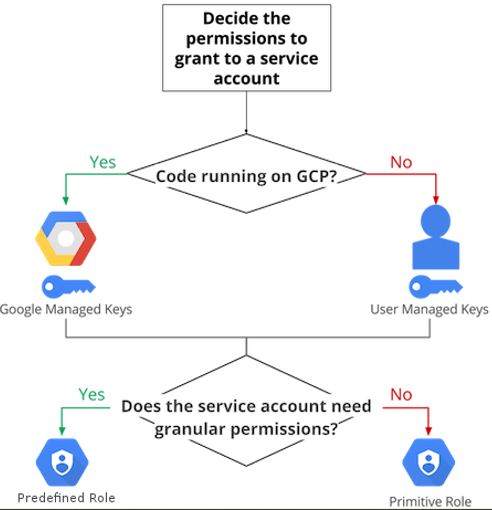
  • In deciding how to use a service account, use the following flow-chart to guide you in your decision-making process.

  • Rotate your service account keys using the IAM service account API.
  • For production workloads, it’s best practice to use user-managed service accounts instead of the default service accounts.