Friday, 25 March 2022

Google Cloud Platform Overview

 The Google Cloud Platform is the infrastructure that powers the Google products you are familiar with including Gmail, Search, and Google Photos.

In April of 2008, Google announced its first service called App Engine, a cloud compute service for developing and hosting web applications in Google-managed data centers. Since then, Google has evolved and added more cloud services to its platform.

GCP lets developers build and host applications and websites, store data, and analyze data, all on Google’s scalable and reliable computing infrastructure.

It has hundreds of products and tools in categories like compute, storage, databases, networking, and machine learning that seamlessly integrates with each other.

Compute products help us deploy our applications in the cloud. For example, you may want to deploy a simple e-commerce web application in GCP, and for that, you might want to use App Engine or provision a Compute Engine instance to host your application.

Storage and database products help us store, retrieve, and query data in fully managed cloud environments. For example, you may want to store data from a physical fitness app and the requirement is to make sure that the relational databases are highly available, knowing this, you might want to use Cloud Spanner to accomplish this requirement.

Moreover, networking services like the Virtual Private Cloud, Cloud VPN, Cloud Router, and Cloud Interconnect helps us manage and scale our global network infrastructure seamlessly.

Google also offers machine learning and artificial intelligence (AI) products. You can build and deploy your machine learning models to AI platforms or leverage on easy-to-use pre-trained machine learning APIs like Vision and Natural Language.

Projects

Any Google cloud resources that you allocate and provision must belong to a project. Think of projects as the organizing entity for the things you will build in GCP.

A project is composed of settings, permissions, and other metadata that describe your applications. Resources within a single project can work together straightforward by communicating through an internal network, subject to region-and-zone rules. A project can’t access another project’s resources unless configured to do so using Shared VPC or VPC Network Peering.
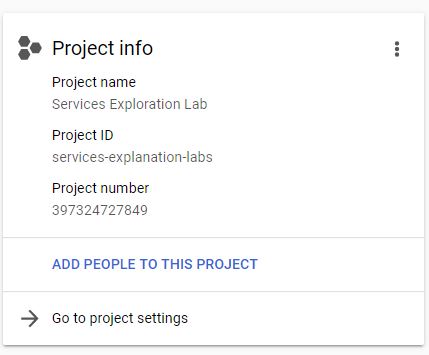
Each Google Cloud project has the following information:

  • Project Name – which you will provide
  • Project ID – which you can provide or Google Cloud can provide for us
  • Project Number – which Google Cloud provides

A project ID is unique across Google Cloud. You can delete projects but the ID can never be used again.

A project serves as a namespace, which means that every resource within each project must have a unique name. Though you can generally reuse resource names if they are in separate projects, some resource names must be globally unique.

How do we interact with Google Cloud Platform services?

There are three different ways to interact with GCP services.

1. Cloud Console
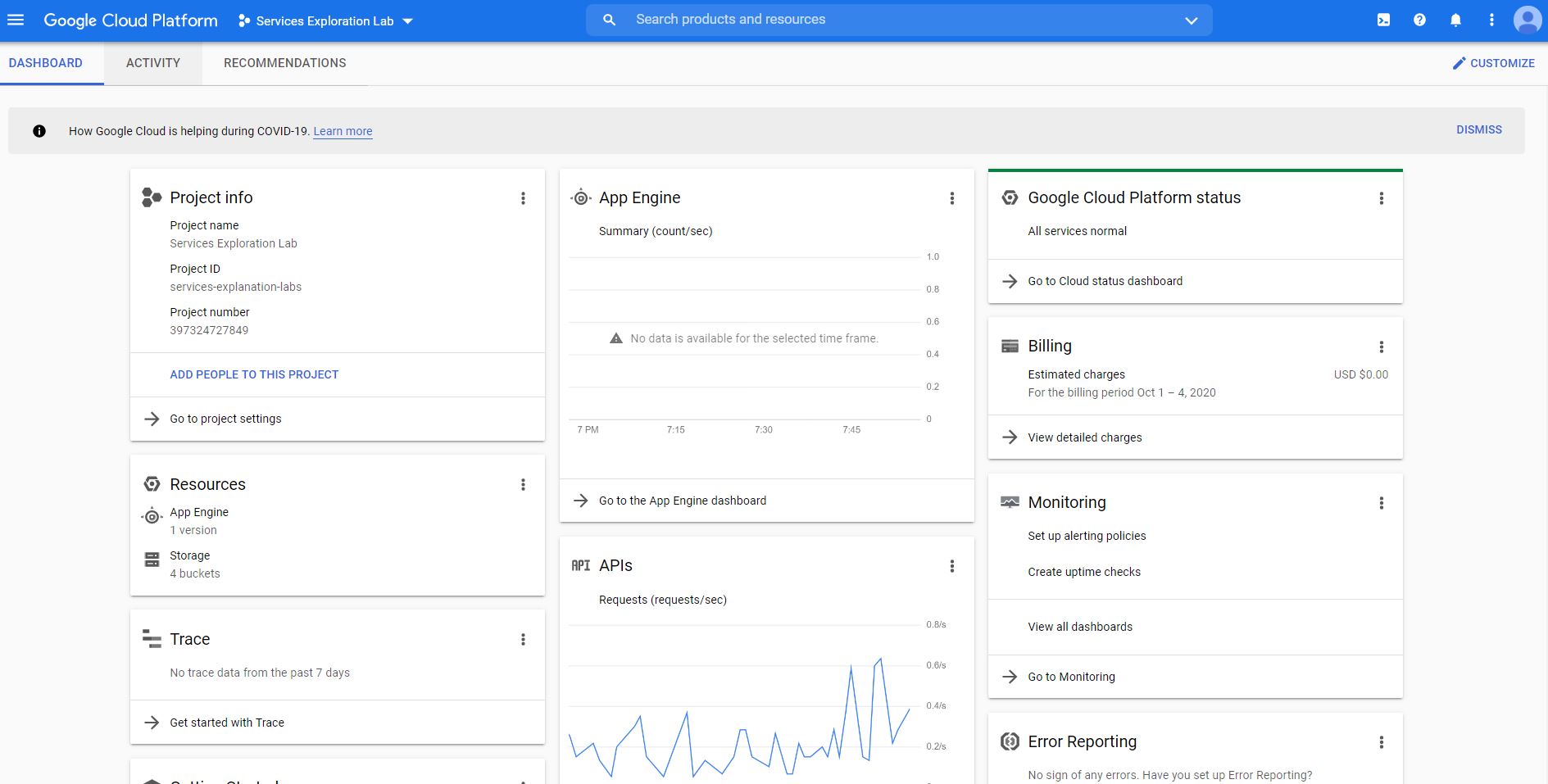
The Google Cloud console provides a web-based graphical user interface that you can use to manage your Google Cloud projects. In using the Cloud Console, you start by creating a new project or by choosing an existing project. From there, you can configure the resources you created in the context of that project.

The two other ways to interact with Google Cloud services utilize the use of the command line interface and the gcloud tool. The gcloud tool lets us manage development workflow and Google cloud resources via a terminal window.

To run gcloud commands, you can use the following: Cloud SDK and Cloud Shell.

2. Cloud SDK
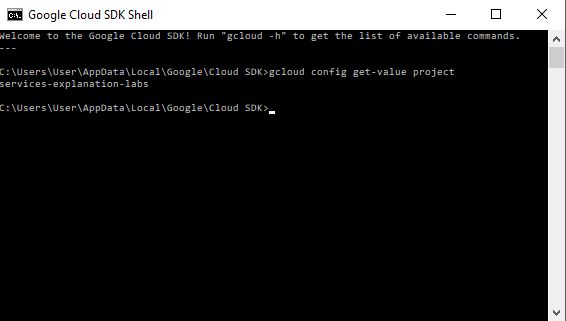
You can install Cloud SDK on your machine. The SDK includes the gcloud tool so you can open a terminal window on your own computer and run commands to manage Google Cloud services.

To install Cloud SDK on your computer, visit the Cloud SDK installation instructions page.

https://cloud.google.com/sdk/docs/downloads-versioned-archives

3. Cloud Shell
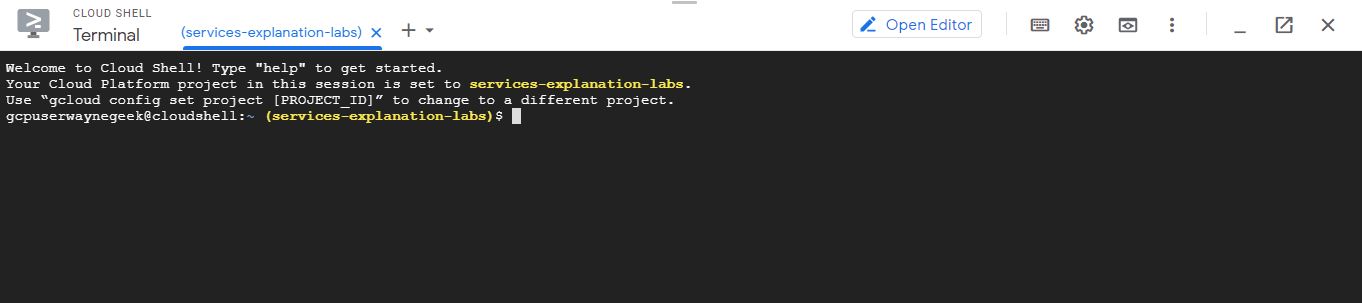
The cloud shell is a browser-based shell that you can open via Google Console.

Cloud Shell provides the following:

  • A temporary Compute Engine virtual machine instance running on Debian based Linux operating system.
  •  A built-in code editor.
  • 5 GB of persistent disk storage mounted as your $HOME directory on the virtual machine.
  • Pre-installed Cloud SDK and other tools.
  • Language support for Java, Go, Python, Node.js, PHP, Ruby and .NET.
  • Web preview functionality.
  • Built-in authorization for access to Cloud Console projects and resources.

The number of services that Google Cloud offers are growing. When you develop your website or application on Google Cloud, you mix and match these services into combinations that fit the requirements of the infrastructure you need.

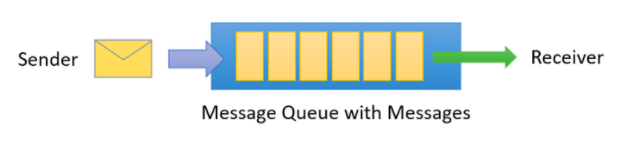
Azure Service Bus


  • A fully managed message broker service.
  • It allows you to decouple applications and services. 
  • Provides a reliable and secure platform for asynchronous data and state transfer.
  • Enables you to deliver messages to multiple subscribers and fan-out message delivery to downstream systems.

Features

  • Message Sessions for implementing first in, first out (FIFO) and request-response patterns to ensure the order of messages in the queue.
  • Autoforwarding allows you to remove messages from a queue or subscription and transfer it to a different queue or topic (must be in the same namespace).
  • A dead-letter queue holds the messages that can’t be delivered to any receiver.
  • It supports a scheduled delivery of messages.
  • You can set aside a message using message deferral.
  • With client-side batching, you can delay the sending of messages for a certain period of time.
  • Autodelete on idle enables you to set an idle interval to automatically delete a queue. Five minutes is the minimum duration.
  • Duplicate detection allows you to resend the same message and discard any duplicate copies.
  • You can continue the operation of your environment in a different region or datacenter with geo-disaster recovery.

Components

  • A container for all messaging components is called a namespace.
  • You send and receive messages from queues (point-to-point communication).
  • Multiple queues and topics are supported in a single namespace, and namespaces often serve as application containers.

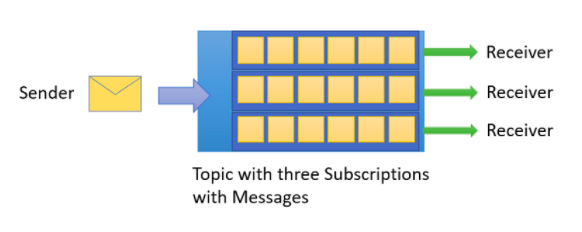
azure service bus 1

  • Topics also allow you to send and receive messages and mainly used in publish/subscribe scenarios. It contains multiple independent subscriptions called entities.
  • To filter specific messages, you can use rules and filters to define conditions that trigger optional actions.

azure service bus 2

Security

  • Shared Access Signatures (SAS) guards access to Service Bus based on authorization rules.
  • You can authenticate and authorize an application to access Service Bus entities such as queues, topics, subscriptions, and filters using Azure AD.
  • Create a security identity using Managed identities for Azure resources and associate that identity with access-control roles to grant custom permissions for accessing specific Azure resources.

Pricing

  • You are charged based on the following:
    • The number of operations
    • The number of AMQP connections or HTTP calls
  • For hybrid connections, you are charged based on the number of listeners.
  • With Windows Communication Foundation (WCF) relays, you are charged based on the message volume and relay hours.

Azure DevOps


  • A service that offers a set of tools for planning, building, and deploying applications.

Features

  • Azure Boards
    • It allows you to track features, user stories, tasks, and bugs associated with your project.
    • You can also customize your dashboards and track progress easily during your project lifecycle.
  • Azure Pipelines
    • A CI/CD service that helps you build and test your code automatically.
    • Enables you to deploy your codes to multiple targets at the same time.
  • Azure Repos
    • Store and manage your codes using a set of version control tools.
    • It supports a version control system to track every change you made in your code.
  • Azure Test Plans
    • A test management solution that supports end-to-end traceability.
    • Run tests simultaneously using exploratory test sessions.
  • Azure Artifacts
    • Allows you to create, host, and share your code/packages with your team or other organization.
    • You can share your code by storing Maven, npm, NuGet, and Python packages together.

Azure DevTest Labs

  • A self-service sandbox that helps you create Dev/Test environments.
  • You can quickly provision different environments by using reusable templates and artifacts.
  • It also has a cost management feature to track your VMs and PaaS resources to stay within the allocated budget.

GitHub Actions for Azure

  • Automates software development workflows.
  • workflow enables you to build, test, package, release, and deploy projects on Azure.
  • Each workflow is composed of individual actions that run after a particular event. These actions are defined in YAML files. 
  • You can find all the available actions in the Marketplace for GitHub Actions for Azure.

Azure Serverless


  • Enables you to build applications without managing infrastructure.

Azure Functions

  • Enables you to run a small piece of code to do a task.
  • A single task is performed for each invocation.
  • Supported languages: C#, Java, JavaScript, Python, and PowerShell
  • You can run your code based on the HTTP requests or schedule when your function runs.
  • You are only charged for the time you run your code.

Azure Logic Apps

  • Allows you to automate your workflows without writing a single line of code.
  • Build your workflow using a logic app designer.
  • Components:
    • Workflow helps you create a series of steps for your logic app.
    • Managed connectors allow you to access and work with your data.
    • Trigger is the first step to run your logic app. 
    • Actions are steps that happen after the trigger and perform tasks in the workflow of your logic app.
    • Enterprise Integration Pack allows you to create an automated, scalable enterprise integration workflow.

Azure Event Grid 

  • A network to route events between applications
  • Route custom events to different endpoints.
  • Components:
    • Events – The information that happened in the system.
    • Event sources – Where the event comes from.
    • Topics – It provides an endpoint where the publisher sends events.
    • Event subscriptions – Filter the events that are sent to you.
    • Event handlers – The service that will process the event.
  • You must provide a SAS token or key authentication before publishing a topic.

Azure Machine Learning


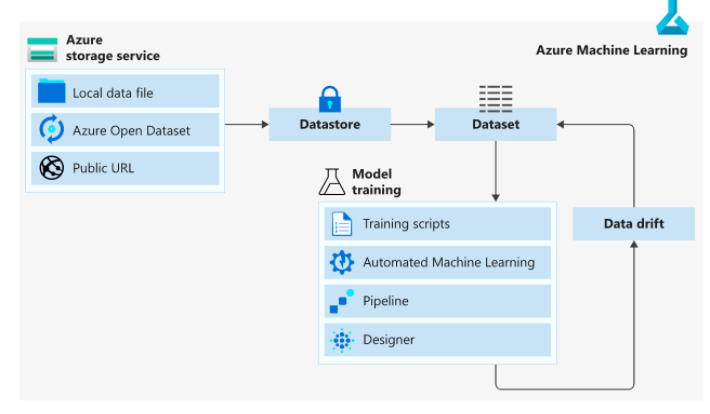
  • A service to train, deploy, automate, manage, and track machine learning models.
  • Azure ML offers Basic and Enterprise editions.
  • You can use Azure ML SDK for PythonAzure ML Studio, and ML CLI to manage your deployed models.
  • You can automate and accelerate the ML lifecycle using MLOps.
  • Azure ML designer allows you to visually connect (drag-and-drop) datasets and modules without writing any code.
  • ML pipelines provide a complete logical workflow and an ordered sequence of steps.
  • AutoML uses the target metric you specify to train and tune a model.

azure machine learning

  • Azure Cognitive Services enables developers to build cognitive intelligent applications without having AI or data science skills. The following are the Azure Cognitive REST APIs that you can use:
    • Vision, Speech, Language, Search, and Decision APIs.

Azure Bot Service 

  • Build a bot that uses natural language and speech capabilities to communicate with your users.
  • You can integrate Bot Service across multiple communication channels such as Microsoft Teams, Slack, and Facebook Messenger.
  • Use Bot Framework Composer if you need a visual editing canvas for conversation flows.
  • With Bot Framework SDK, you can create a bot that uses speech, understands natural language, and handle questions and answers.

Azure Big Data


  • A service to store and process large amounts of data sets.
  • Use Azure Data Lake Analytics to write queries that help you transform your data and extract valuable insights.
    • Offers dynamic scaling and data parallelism.
    • You can integrate Data Lake Analytics with Active Directory to manage users’ permissions.
  • Create big data clusters for Hadoop, Spark, and Kafka with Azure HDInsight.
    • Reduce costs by scaling your workloads up and down.
    • Monitor all your clusters with Azure Monitor.
  • Azure Databricks is based on Apache Spark capabilities that provide an interactive workspace and streamlined workflows.
    • Enables you to read data from multiple sources and use Spark to create breakthrough insights.
  • Azure Synapse Analytics is a data warehousing and big data analytics service.
    • Allows you to ingest, prepare, manage, and serve data for BI and ML needs.

azure big data

  • You can use Azure Event Hubs for big data streaming and event ingestion service.
    • Enables you to receive and process millions of events per second.
  • Azure Stream Analytics provides you real-time analytics and a complex event-processing engine.
    • Simultaneously analyze and process large volumes of streaming data from multiple sources.

azure big data

Azure Internet of Things (IoT)


  • A service that allows you to connect, monitor, and control one or more IoT devices that can communicate with back-end services hosted in the cloud.

Azure IoT Hub

  • A PaaS solution that provides complete control over the collection and processing of IoT data.
  • To create a complete end-to-end solution, you can integrate the IoT Hub with other Azure services.
    • Azure Event Grid
    • Azure Logic Apps
    • Azure Machine Learning
    • Azure Stream Analytics 
  • Message routing integration automatically helps you respond to a device-reported state change.
  • You can use IoT Hub scaling if you are approaching the message limit on your IoT Hub.

Azure IoT Central

  • A SaaS solution that provides a collection of industry-specific application templates.
  • You can create your own device template to define the characteristics and behavior of a device.
  • Configure custom dashboards to monitor your device’s health and telemetry.
  • Build custom rules when device telemetry crosses a specified threshold.
  • You can apply single or bulk updates by creating jobs.

Azure Sphere

  • An IoT security solution that helps you protect your data, privacy, and infrastructure.
  • Components:
    • Azure Sphere chip – a microcontroller unit that provides real-time processing capabilities.
    • Azure Sphere OS – an operating system based on Linux that runs on an Azure Sphere chip.
    • Azure Sphere Security Service – it supports certificate-based authentication, automatic software updates, and failure reporting. By default, the data is encrypted at rest.
  • The Azure Sphere devices can run on two types of applications:
    • High-level applications for containers.
    • Real-time capable applications (RTApps) for bare metals.

Azure IoT Products

  • Azure IoT solution accelerators allow you to customize solution templates for common IoT scenarios.
  • Azure IoT Edge enables you to deploy cloud analytics and custom business logic locally on IoT edge devices.
  • Create knowledge graphs based on digital models of entire environments using Azure Digital Twins.
  • If you need to monitor, analyze, and visualize your IoT data in real-time, you can use Azure Time Series Insights.
  • Azure Sphere is an IoT security solution that helps you protect your data, privacy, and infrastructure.
  • A real-time operating system for IoT devices, powered by MCUs is called Azure RTOS.
  • Azure SQL Edge is an optimized SQL database engine for IoT and IoT Edge deployments.