Friday, 25 March 2022

Azure Internet of Things (IoT)


  • A service that allows you to connect, monitor, and control one or more IoT devices that can communicate with back-end services hosted in the cloud.

Azure IoT Hub

  • A PaaS solution that provides complete control over the collection and processing of IoT data.
  • To create a complete end-to-end solution, you can integrate the IoT Hub with other Azure services.
    • Azure Event Grid
    • Azure Logic Apps
    • Azure Machine Learning
    • Azure Stream Analytics 
  • Message routing integration automatically helps you respond to a device-reported state change.
  • You can use IoT Hub scaling if you are approaching the message limit on your IoT Hub.

Azure IoT Central

  • A SaaS solution that provides a collection of industry-specific application templates.
  • You can create your own device template to define the characteristics and behavior of a device.
  • Configure custom dashboards to monitor your device’s health and telemetry.
  • Build custom rules when device telemetry crosses a specified threshold.
  • You can apply single or bulk updates by creating jobs.

Azure Sphere

  • An IoT security solution that helps you protect your data, privacy, and infrastructure.
  • Components:
    • Azure Sphere chip – a microcontroller unit that provides real-time processing capabilities.
    • Azure Sphere OS – an operating system based on Linux that runs on an Azure Sphere chip.
    • Azure Sphere Security Service – it supports certificate-based authentication, automatic software updates, and failure reporting. By default, the data is encrypted at rest.
  • The Azure Sphere devices can run on two types of applications:
    • High-level applications for containers.
    • Real-time capable applications (RTApps) for bare metals.

Azure IoT Products

  • Azure IoT solution accelerators allow you to customize solution templates for common IoT scenarios.
  • Azure IoT Edge enables you to deploy cloud analytics and custom business logic locally on IoT edge devices.
  • Create knowledge graphs based on digital models of entire environments using Azure Digital Twins.
  • If you need to monitor, analyze, and visualize your IoT data in real-time, you can use Azure Time Series Insights.
  • Azure Sphere is an IoT security solution that helps you protect your data, privacy, and infrastructure.
  • A real-time operating system for IoT devices, powered by MCUs is called Azure RTOS.
  • Azure SQL Edge is an optimized SQL database engine for IoT and IoT Edge deployments.

Azure Role-Based Access Control (RBAC)


  • A role-based access control service to manage user’s access to Azure resources including what they can do with those resources and what areas they can access.
  • It is an authorization system based on Azure Resource Manager, which provides fine-grained access management of Azure resources.

Concepts

  • A role assignment is composed of security principal, role definition, and scope.
    • Security Principal – an object representing a user, group, service principal, and managed identity that requests access to Azure resources.
    • Role Definition – a list of permissions that can be performed, such as read, write and delete.
    • Scope – set of resources to which access applies.
  • Attaching a role definition to a user, group, service principal, and managed identity to grant access to a particular scope is called role assignment.
  • You can attach multiple role assignments since RBAC is an additive model.
  • Azure RBAC supports both allow and deny assignments.

Roles

  • Classic subscription administrator roles have full access to an Azure subscription.
    • Account Administrator
      • You can only have 1 Account Administrator per Azure account.
      • This role is the billing owner of the Azure subscription.
      • It can manage subscriptions and billings in the account.
      • Create and cancel subscriptions.
    • Service Administrator
      • For this role, you can only have 1 Service Administrator per Azure subscription.
      • For new subscriptions, the Account Administrator is also the Service Administrator. This role has full access to the Azure portal.
      • It can assign users with a Co-Administrator role.
    • Co-Administrator
      • You can only create 200 Co-Administrator per Azure subscription.
      • This role has the same privileges as the Service Administrator, but it can’t change the association of subscriptions to Azure directories.
      • A user with this role can only assign a Co-Administrator role to other users.
  • Azure Roles – Azure RBAC has over 70 built-in roles. The following are the four fundamental Azure roles:
    • Owner 
      • Full access to all Azure resources.
      • Delegate access to other users.
    • Contributor
      • Create and manage all types of resources in Azure.
      • The role can create a new tenant in Azure AD.
      • It cannot grant access to other users.
    • Reader
      • A user with this role can only view Azure resources.
    • User Access Administrator
      • It has permissions to manage user access to all types of resources.
  • Azure AD Roles – Provide access to manage Azure AD resources in a directory such as create users, assign administrative roles to others, manage licenses, reset passwords, and manage domains.
    • Global Administrator
      • This role can manage access to all the administrative features in Azure AD.
      • It can assign administrator roles to the users in your organization.
      • Reset the password of users and administrators in the account.
    • User Administrator
      • Create and manage different types of users and groups in Azure.
      • Manage support tickets and monitor service health.
      • This role can only change the passwords of users and administrators.
    • Billing Administrator
      • Make purchases in Azure.
      • The role can also monitor service health.
      • Manage subscriptions and support tickets.

Azure Roles

Azure AD Roles

Manage access to Azure resources.

Manage access to Azure Active Directory (Active AD) resources.

It supports custom roles.

It supports custom roles.

The scope can be specified at multiple levels (management group, subscription, resource group, resource).

The scope is only at the tenant level.

Role information can be accessed through Azure Portal, CLI, PowerShell, Resource Manager templates, and REST APIs.

Role information can be accessed through Azure Admin Portal, Microsoft 365 Admin Center, Microsoft Graph, and Azure AD PowerShell.

Azure Compliance Manager


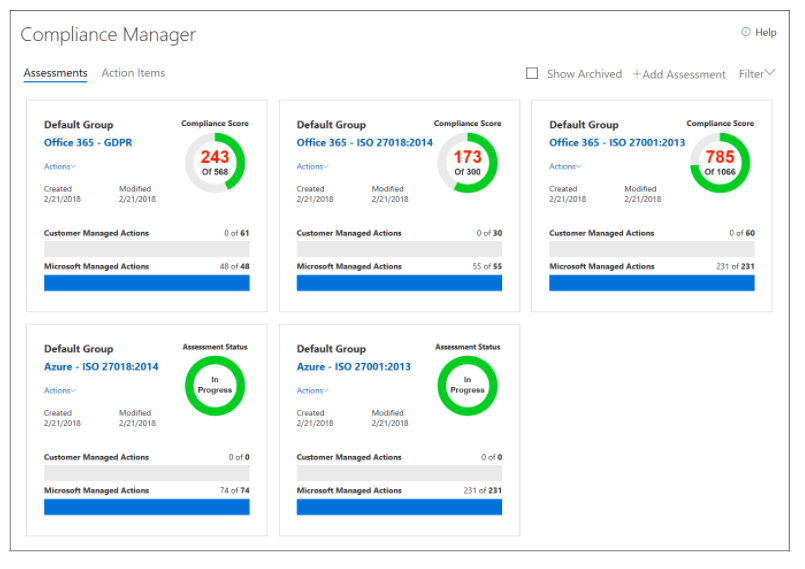
  • A dashboard and monitoring tool that summarizes data protection, compliance score, and recommendations.
  • It allows you to assign, track, and record compliance and assessment-related activities.
  • Recommendations for industry regulations: GDPR, ISO, and NIST
  • You can upload and manage artifacts or evidence in a secure repository.

azure compliance manager

Azure Blueprints


  • Creates templates for standard and repeatable Azure environments that comply with an organization’s compliance requirements and operational standards.
  • It supports the following resources as artifacts:
    • Role Assignments
    • Policy Assignments
    • Azure Resource Manager (ARM) templates
    • Resource Groups
  • It provides resource locking to prevent unwanted changes.
  • A Blueprint may have its own parameters, but these can only be created if a Blueprint is developed from the REST API rather than Azure Portal.
  • Blueprints role: Owner, Contributor, Blueprint Contributor, Blueprint Operator
  • With Blueprints, you have a centralized location for environment management, including deployment, versioning, and update.
  • If your subscriptions are in the same Azure Blueprint, you can upgrade multiple subscriptions at once.
  • You can also use Blueprints to set up resource groups within subscriptions.
  • Set up multiple environments within the same shared environment, when you assign a Blueprint to a subscription.

Azure Advisor


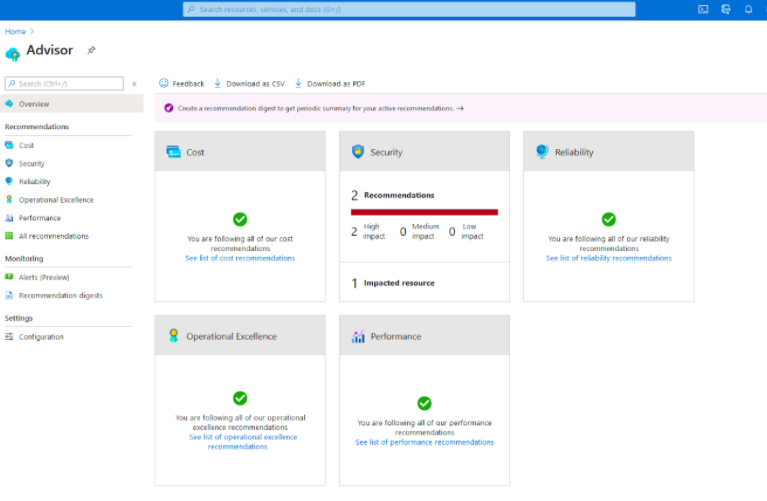
  • Advisor analyzes your configurations and offers personalized, actionable recommendations.
  • It provides relevant best practices to help you improve:
    • Cost
    • Security
    • Reliability
    • Operational Excellence
    • Performance
  • Access recommendations are available at no additional cost.

azure advisor

Azure Policy


  • Ensure resources are compliant with a set of rules.
  • Manage your policies in a centralized location where you can track their compliance status and verify the non-compliant resources.
  • Select between built-in policies and custom policies.
  • Implement proper guardrails and assess compliance across the organization
  • Policy vs. RBAC
    • A policy maintains compliance with the resource state, while RBAC focuses on controlling user actions at different scopes.
    • Even if the user has access to perform an action, if the result is a non-compliant resource, the policy will still block the create or update option.
  • JSON format is used to create a policy.
  • You can manage the evaluation and outcome with resource provider, and the results are reported to Azure Policy.
  • Policy order of evaluation: Disabled, Append/Modify, Deny and Audit
  • Azure Policy effects:
    • Append – add additional fields to the requested resource.
    • Audit – a warning event for a non-compliant resource.
    • AuditIfNotExists – audit the resources when the condition is met.
    • Deny – prevents the request before being sent to the Resource Provider.
    • DeployIfNotExists – if the condition is met, it allows you to execute a template deployment.
    • Disabled – allows you to disable a single assignment, rather than disabling all assignments under that policy.
    • Modify – manage tags of resources.
  • Determine the assigned resources with policy assignments.

Azure Service Health


  • Gives you a personalized view of the status of your Azure services and regions.
  • Azure Service Health is composed of three services:
    • Azure status – informs you of service outages in Azure.
    • Service Health – helps you have a customized view of your services’ health in a region.
    • Resource Health – provides health information on your Azure resources.
  • Active events in service health:
    • Service issues
    • Planned maintenance
    • Health advisories
    • Security advisories
  • Track any alerts and issues in real-time and get full reports once resolved.
  • You can configure alerts to notify you about active and upcoming service issues.