Thursday, 20 September 2018

Ethical Hacking - DNS Poisoning

DNS Poisoning is a technique that tricks a DNS server into believing that it has received authentic information when, in reality, it has not. It results in the substitution of false IP address at the DNS level where web addresses are converted into numeric IP addresses. It allows an attacker to replace IP address entries for a target site on a given DNS server with IP address of the server controls. An attacker can create fake DNS entries for the server which may contain malicious content with the same name.
For instance, a user types www.google.com, but the user is sent to another fraud site instead of being directed to Google’s servers. As we understand, DNS poisoning is used to redirect the users to fake pages which are managed by the attackers.

DNS Poisoning − Exercise

Let’s do an exercise on DNS poisoning using the same tool, Ettercap.
DNS Poisoning is quite similar to ARP Poisoning. To initiate DNS poisoning, you have to start with ARP poisoning, which we have already discussed in the previous chapter. We will use DNS spoof plugin which is already there in Ettercap.
Step 1 − Open up the terminal and type “nano etter.dns”. This file contains all entries for DNS addresses which is used by Ettercap to resolve the domain name addresses. In this file, we will add a fake entry of “Facebook”. If someone wants to open Facebook, he will be redirected to another website.

Terminal
Step 2 − Now insert the entries under the words “Redirect it to www.linux.org”. See the following example −
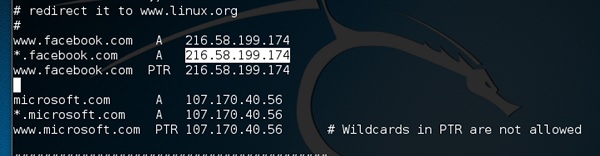
Redirect
Step 3 − Now save this file and exit by saving the file. Use “ctrl+x” to save the file.
Step 4 − After this, the whole process is same to start ARP poisoning. After starting ARP poisoning, click on “plugins” in the menu bar and select “dns_spoof” plugin.
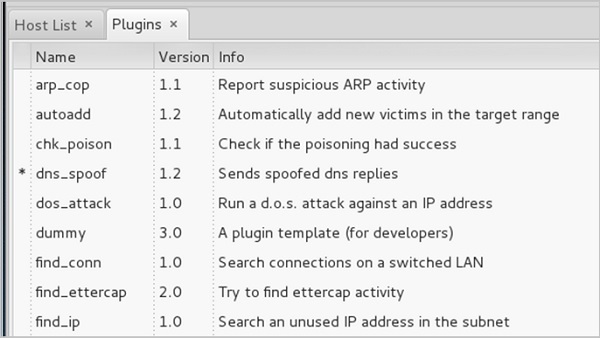
Plugins
Step 5 − After activating the DNS_spoof, you will see in the results that facebook.com will start spoofed to Google IP whenever someone types it in his browser.

Activating
It means the user gets the Google page instead of facebook.com on their browser.
In this exercise, we saw how network traffic can be sniffed through different tools and methods. Here a company needs an ethical hacker to provide network security to stop all these attacks. Let’s see what an ethical hacker can do to prevent DNS Poisoning.

Defenses against DNS Poisoning

As an ethical hacker, your work could very likely put you in a position of prevention rather than pen testing. What you know as an attacker can help you prevent the very techniques you employ from the outside.
Here are defenses against the attacks we just covered from a pen tester’s perspective −
  • Use a hardware-switched network for the most sensitive portions of your network in an effort to isolate traffic to a single segment or collision domain.
  • Implement IP DHCP Snooping on switches to prevent ARP poisoning and spoofing attacks.
  • Implement policies to prevent promiscuous mode on network adapters.
  • Be careful when deploying wireless access points, knowing that all traffic on the wireless network is subject to sniffing.
  • Encrypt your sensitive traffic using an encrypting protocol such as SSH or IPsec.
  • Port security is used by switches that have the ability to be programmed to allow only specific MAC addresses to send and receive data on each port.
  • IPv6 has security benefits and options that IPv4 does not have.
  • Replacing protocols such as FTP and Telnet with SSH is an effective defense against sniffing. If SSH is not a viable solution, consider protecting older legacy protocols with IPsec.
  • Virtual Private Networks (VPNs) can provide an effective defense against sniffing due to their encryption aspect.
  • SSL is a great defense along with IPsec.

Summary

In this chapter, we discussed how attackers can capture and analyze all the traffic by placing a packet sniffer in a network. With a real-time example, we saw how easy it is to get the credentials of a victim from a given network. Attackers use MAC attacks, ARP and DNS poisoning attacks to sniff the network traffic and get hold of sensitive information such as email conversations and passwords.

Ethical Hacking - ARP Poisoning

Address Resolution Protocol (ARP) is a stateless protocol used for resolving IP addresses to machine MAC addresses. All network devices that need to communicate on the network broadcast ARP queries in the system to find out other machines’ MAC addresses. ARP Poisoning is also known as ARP Spoofing.
Here is how ARP works −
  • When one machine needs to communicate with another, it looks up its ARP table.
  • If the MAC address is not found in the table, the ARP_request is broadcasted over the network.
  • All machines on the network will compare this IP address to MAC address.
  • If one of the machines in the network identifies this address, then it will respond to the ARP_request with its IP and MAC address.
  • The requesting computer will store the address pair in its ARP table and communication will take place.

What is ARP Spoofing?

ARP packets can be forged to send data to the attacker’s machine.
  • ARP spoofing constructs a large number of forged ARP request and reply packets to overload the switch.
  • The switch is set in forwarding mode and after the ARP table is flooded with spoofed ARP responses, the attackers can sniff all network packets.
Attackers flood a target computer ARP cache with forged entries, which is also known as poisoning. ARP poisoning uses Man-in-the-Middle access to poison the network.

What is MITM?

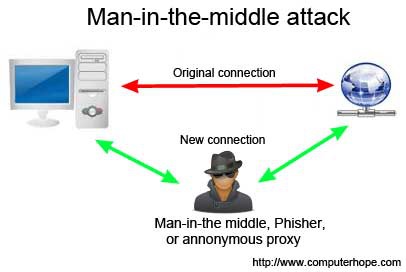
The Man-in-the-Middle attack (abbreviated MITM, MitM, MIM, MiM, MITMA) implies an active attack where the adversary impersonates the user by creating a connection between the victims and sends messages between them. In this case, the victims think that they are communicating with each other, but in reality, the malicious actor controls the communication.
Third Person
A third person exists to control and monitor the traffic of communication between two parties. Some protocols such as SSL serve to prevent this type of attack.

ARP Poisoning − Exercise

In this exercise, we have used BetterCAP to perform ARP poisoning in LAN environment using VMware workstation in which we have installed Kali Linux and Ettercap tool to sniff the local traffic in LAN.
For this exercise, you would need the following tools −
  • VMware workstation
  • Kali Linux or Linux Operating system
  • Ettercap Tool
  • LAN connection
Note − This attack is possible in wired and wireless networks. You can perform this attack in local LAN.
Step 1 − Install the VMware workstation and install the Kali Linux operating system.
Step 2 − Login into the Kali Linux using username pass “root, toor”.
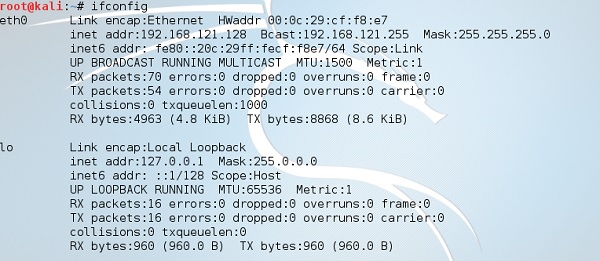
Step 3 − Make sure you are connected to local LAN and check the IP address by typing the command ifconfig in the terminal.
Ifconfig
Step 4 − Open up the terminal and type “Ettercap –G” to start the graphical version of Ettercap.
Ettercap
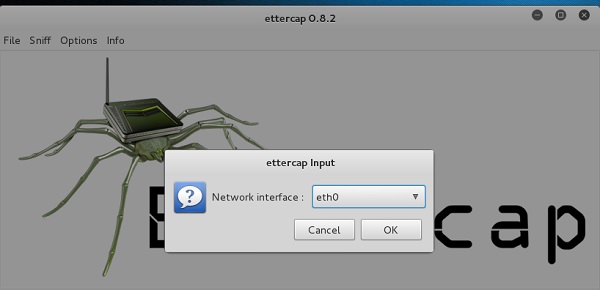
Step 5 − Now click the tab “sniff” in the menu bar and select “unified sniffing” and click OK to select the interface. We are going to use “eth0” which means Ethernet connection.
Ettercap Input
Step 6 − Now click the “hosts” tab in the menu bar and click “scan for hosts”. It will start scanning the whole network for the alive hosts.
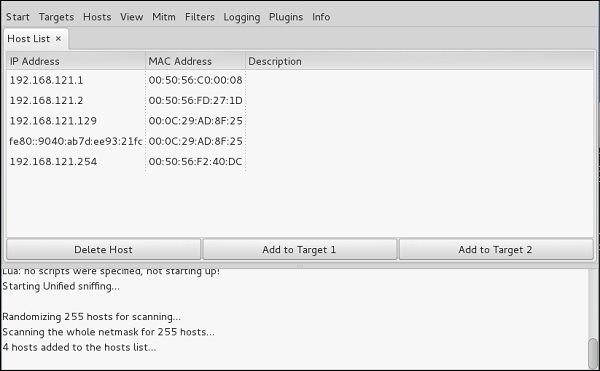
Step 7 − Next, click the “hosts” tab and select “hosts list” to see the number of hosts available in the network. This list also includes the default gateway address. We have to be careful when we select the targets.
Host Tab
Step 8 − Now we have to choose the targets. In MITM, our target is the host machine, and the route will be the router address to forward the traffic. In an MITM attack, the attacker intercepts the network and sniffs the packets. So, we will add the victim as “target 1” and the router address as “target 2.”
In VMware environment, the default gateway will always end with “2” because “1” is assigned to the physical machine.
Step 9 − In this scenario, our target is “192.168.121.129” and the router is “192.168.121.2”. So we will add target 1 as victim IP and target 2 as router IP.
Target
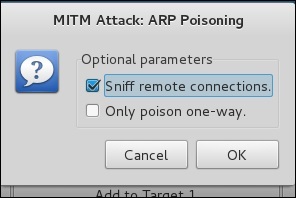
Step 10 − Now click on “MITM” and click “ARP poisoning”. Thereafter, check the option “Sniff remote connections” and click OK.
Mitm Attack
Step 11 − Click “start” and select “start sniffing”. This will start ARP poisoning in the network which means we have enabled our network card in “promiscuous mode” and now the local traffic can be sniffed.
Note − We have allowed only HTTP sniffing with Ettercap, so don’t expect HTTPS packets to be sniffed with this process.
Step 12 − Now it’s time to see the results; if our victim logged into some websites. You can see the results in the toolbar of Ettercap.
Result
This is how sniffing works. You must have understood how easy it is to get the HTTP credentials just by enabling ARP poisoning.
ARP Poisoning has the potential to cause huge losses in company environments. This is the place where ethical hackers are appointed to secure the networks.
Like ARP poisoning, there are other attacks such as MAC flooding, MAC spoofing, DNS poisoning, ICMP poisoning, etc. that can cause significant loss to a network.
In the next chapter, we will discuss another type of attack known as DNS poisoning.

Ethical Hacking - Sniffing Tools

There are so many tools available to perform sniffing over a network, and they all have their own features to help a hacker analyze traffic and dissect the information. Sniffing tools are extremely common applications. We have listed here some of the interesting ones −
  • BetterCAP − BetterCAP is a powerful, flexible and portable tool created to perform various types of MITM attacks against a network, manipulate HTTP, HTTPS and TCP traffic in real-time, sniff for credentials, and much more.
  • Ettercap − Ettercap is a comprehensive suite for man-in-the-middle attacks. It features sniffing of live connections, content filtering on the fly and many other interesting tricks. It supports active and passive dissection of many protocols and includes many features for network and host analysis.
  • Wireshark − It is one of the most widely known and used packet sniffers. It offers a tremendous number of features designed to assist in the dissection and analysis of traffic.
  • Tcpdump − It is a well-known command-line packet analyzer. It provides the ability to intercept and observe TCP/IP and other packets during transmission over the network. Available at www.tcpdump.org.
  • WinDump − A Windows port of the popular Linux packet sniffer tcpdump, which is a command-line tool that is perfect for displaying header information.
  • OmniPeek − Manufactured by WildPackets, OmniPeek is a commercial product that is the evolution of the product EtherPeek.
  • Dsniff − A suite of tools designed to perform sniffing with different protocols with the intent of intercepting and revealing passwords. Dsniff is designed for Unix and Linux platforms and does not have a full equivalent on the Windows platform.
  • EtherApe − It is a Linux/Unix tool designed to display graphically a system's incoming and outgoing connections.
  • MSN Sniffer − It is a sniffing utility specifically designed for sniffing traffic generated by the MSN Messenger application.
  • NetWitness NextGen − It includes a hardware-based sniffer, along with other features, designed to monitor and analyze all traffic on a network. This tool is used by the FBI and other law enforcement agencies.
A potential hacker can use any of these sniffing tools to analyze traffic on a network and dissect information.

Ethical Hacking - Sniffing

Sniffing is the process of monitoring and capturing all the packets passing through a given network using sniffing tools. It is a form of “tapping phone wires” and get to know about the conversation. It is also called wiretappingapplied to the computer networks.
There is so much possibility that if a set of enterprise switch ports is open, then one of their employees can sniff the whole traffic of the network. Anyone in the same physical location can plug into the network using Ethernet cable or connect wirelessly to that network and sniff the total traffic.
In other words, Sniffing allows you to see all sorts of traffic, both protected and unprotected. In the right conditions and with the right protocols in place, an attacking party may be able to gather information that can be used for further attacks or to cause other issues for the network or system owner.

What can be sniffed?

One can sniff the following sensitive information from a network −
  • Email traffic
  • FTP passwords
  • Web traffics
  • Telnet passwords
  • Router configuration
  • Chat sessions
  • DNS traffic

How it works

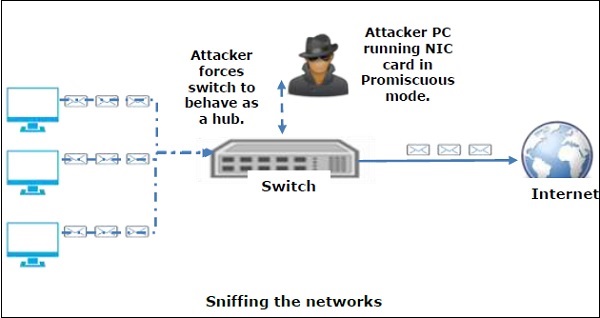
A sniffer normally turns the NIC of the system to the promiscuous mode so that it listens to all the data transmitted on its segment.
Promiscuous mode refers to the unique way of Ethernet hardware, in particular, network interface cards (NICs), that allows an NIC to receive all traffic on the network, even if it is not addressed to this NIC. By default, a NIC ignores all traffic that is not addressed to it, which is done by comparing the destination address of the Ethernet packet with the hardware address (a.k.a. MAC) of the device. While this makes perfect sense for networking, non-promiscuous mode makes it difficult to use network monitoring and analysis software for diagnosing connectivity issues or traffic accounting.
Sniffing Networks
A sniffer can continuously monitor all the traffic to a computer through the NIC by decoding the information encapsulated in the data packets.

Types of Sniffing

Sniffing can be either Active or Passive in nature.

Passive Sniffing

In passive sniffing, the traffic is locked but it is not altered in any way. Passive sniffing allows listening only. It works with Hub devices. On a hub device, the traffic is sent to all the ports. In a network that uses hubs to connect systems, all hosts on the network can see the traffic. Therefore, an attacker can easily capture traffic going through.
The good news is that hubs are almost obsolete nowadays. Most modern networks use switches. Hence, passive sniffing is no more effective.

Active Sniffing

In active sniffing, the traffic is not only locked and monitored, but it may also be altered in some way as determined by the attack. Active sniffing is used to sniff a switch-based network. It involves injecting address resolution packets (ARP) into a target network to flood on the switch content addressable memory (CAM) table. CAM keeps track of which host is connected to which port.
Following are the Active Sniffing Techniques −
  • MAC Flooding
  • DHCP Attacks
  • DNS Poisoning
  • Spoofing Attacks
  • ARP Poisoning

Protocols which are affected

Protocols such as the tried and true TCP/IP were never designed with security in mind and therefore do not offer much resistance to potential intruders. Several rules lend themselves to easy sniffing −
  • HTTP − It is used to send information in the clear text without any encryption and thus a real target.
  • SMTP (Simple Mail Transfer Protocol) − SMTP is basically utilized in the transfer of emails. This protocol is efficient, but it does not include any protection against sniffing.
  • NNTP (Network News Transfer Protocol)− It is used for all types of communications, but its main drawback is that data and even passwords are sent over the network as clear text.
  • POP (Post Office Protocol) − POP is strictly used to receive emails from the servers. This protocol does not include protection against sniffing because it can be trapped.
  • FTP (File Transfer Protocol) − FTP is used to send and receive files, but it does not offer any security features. All the data is sent as clear text that can be easily sniffed.
  • IMAP (Internet Message Access Protocol) − IMAP is same as SMTP in its functions, but it is highly vulnerable to sniffing.
  • Telnet − Telnet sends everything (usernames, passwords, keystrokes) over the network as clear text and hence, it can be easily sniffed.
Sniffers are not the dumb utilities that allow you to view only live traffic. If you really want to analyze each packet, save the capture and review it whenever time allows.

Hardware Protocol Analyzers

Before we go into further details of sniffers, it is important that we discuss about hardware protocol analyzers. These devices plug into the network at the hardware level and can monitor traffic without manipulating it.
  • Hardware protocol analyzers are used to monitor and identify malicious network traffic generated by hacking software installed in the system.
  • They capture a data packet, decode it, and analyze its content according to certain rules.
  • Hardware protocol analyzers allow attackers to see individual data bytes of each packet passing through the cable.
These hardware devices are not readily available to most ethical hackers due to their enormous cost in many cases.

Lawful Interception

Lawful Interception (LI) is defined as legally sanctioned access to communications network data such as telephone calls or email messages. LI must always be in pursuance of a lawful authority for the purpose of analysis or evidence. Therefore, LI is a security process in which a network operator or service provider gives law enforcement officials permission to access private communications of individuals or organizations.
Almost all countries have drafted and enacted legislation to regulate lawful interception procedures; standardization groups are creating LI technology specifications. Usually, LI activities are taken for the purpose of infrastructure protection and cyber security. However, operators of private network infrastructures can maintain LI capabilities within their own networks as an inherent right, unless otherwise prohibited.
LI was formerly known as wiretapping and has existed since the inception of electronic communications.

Ethical Hacking - Fingerprinting

The term OS fingerprinting in Ethical Hacking refers to any method used to determine what operating system is running on a remote computer. This could be −
  • Active Fingerprinting − Active fingerprinting is accomplished by sending specially crafted packets to a target machine and then noting down its response and analyzing the gathered information to determine the target OS. In the following section, we have given an example to explain how you can use NMAP tool to detect the OS of a target domain.
  • Passive Fingerprinting − Passive fingerprinting is based on sniffer traces from the remote system. Based on the sniffer traces (such as Wireshark) of the packets, you can determine the operating system of the remote host.
We have the following four important elements that we will look at to determine the operating system −
  • TTL − What the operating system sets the Time-To-Live on the outbound packet.
  • Window Size − What the operating system sets the Window Size at.
  • DF − Does the operating system set the Don't Fragment bit.
  • TOS − Does the operating system set the Type of Service, and if so, at what.
By analyzing these factors of a packet, you may be able to determine the remote operating system. This system is not 100% accurate, and works better for some operating systems than others.

Basic Steps

Before attacking a system, it is required that you know what operating system is hosting a website. Once a target OS is known, then it becomes easy to determine which vulnerabilities might be present to exploit the target system.
Below is a simple nmap command which can be used to identify the operating system serving a website and all the opened ports associated with the domain name, i.e., the IP address.
$nmap -O -v tutorialspoint.com 
It will show you the following sensitive information about the given domain name or IP address −
Starting Nmap 5.51 ( http://nmap.org ) at 2015-10-04 09:57 CDT 
Initiating Parallel DNS resolution of 1 host. at 09:57 
Completed Parallel DNS resolution of 1 host. at 09:57, 0.00s elapsed 
Initiating SYN Stealth Scan at 09:57
Scanning tutorialspoint.com (66.135.33.172) [1000 ports] 
Discovered open port 22/tcp on 66.135.33.172 
Discovered open port 3306/tcp on 66.135.33.172 
Discovered open port 80/tcp on 66.135.33.172 
Discovered open port 443/tcp on 66.135.33.172 
Completed SYN Stealth Scan at 09:57, 0.04s elapsed (1000 total ports) 
Initiating OS detection (try #1) against tutorialspoint.com (66.135.33.172) 
Retrying OS detection (try #2) against tutorialspoint.com (66.135.33.172) 
Retrying OS detection (try #3) against tutorialspoint.com (66.135.33.172) 
Retrying OS detection (try #4) against tutorialspoint.com (66.135.33.172) 
Retrying OS detection (try #5) against tutorialspoint.com (66.135.33.172) 
Nmap scan report for tutorialspoint.com (66.135.33.172) 
Host is up (0.000038s latency). 
Not shown: 996 closed ports 
PORT     STATE SERVICE 
22/tcp   open  ssh 
80/tcp   open  http 
443/tcp  open  https 
3306/tcp open  mysql  

TCP/IP fingerprint: 
OS:SCAN(V=5.51%D=10/4%OT=22%CT=1%CU=40379%PV=N%DS=0%DC=L%G=Y%TM=56113E6D%P= 
OS:x86_64-redhat-linux-gnu)SEQ(SP=106%GCD=1%ISR=109%TI=Z%CI=Z%II=I%TS=A)OPS 
OS:(O1=MFFD7ST11NW7%O2=MFFD7ST11NW7%O3=MFFD7NNT11NW7%O4=MFFD7ST11NW7%O5=MFF 
OS:D7ST11NW7%O6=MFFD7ST11)WIN(W1=FFCB%W2=FFCB%W3=FFCB%W4=FFCB%W5=FFCB%W6=FF 
OS:CB)ECN(R=Y%DF=Y%T=40%W=FFD7%O=MFFD7NNSNW7%CC=Y%Q=)T1(R=Y%DF=Y%T=40%S=O%A 
OS:=S+%F=AS%RD=0%Q=)T2(R=N)T3(R=N)T4(R=Y%DF=Y%T=40%W=0%S=A%A=Z%F=R%O=%RD=0% 
OS:Q=)T5(R=Y%DF=Y%T=40%W=0%S=Z%A=S+%F=AR%O=%RD=0%Q=)T6(R=Y%DF=Y%T=40%W=0%S= 
OS:A%A=Z%F=R%O=%RD=0%Q=)T7(R=Y%DF=Y%T=40%W=0%S=Z%A=S+%F=AR%O=%RD=0%Q=)U1(R= 
OS:Y%DF=N%T=40%IPL=164%UN=0%RIPL=G%RID=G%RIPCK=G%RUCK=G%RUD=G)IE(R=Y%DFI=N% 
OS:T=40%CD=S)
If you do not have nmap command installed on your Linux system, then you can install it using the following yum command −
$yum install nmap
You can go through nmap command in detail to check and understand the different features associated with a system and secure it against malicious attacks.

Quick Fix

You can hide your main system behind a secure proxy server or a VPN so that your complete identity is safe and ultimately your main system remains safe.

Port Scanning

We have just seen information given by nmap command. This command lists down all the open ports on a given server.
PORT       STATE   SERVICE 
22/tcp     open    ssh 
80/tcp     open    http 
443/tcp    open    https 
3306/tcp   open    mysql
You can also check if a particular port is opened or not using the following command −
$nmap -sT -p 443 tutorialspoint.com
It will produce the following result −
Starting Nmap 5.51 ( http://nmap.org ) at 2015-10-04 10:19 CDT 
Nmap scan report for tutorialspoint.com (66.135.33.172) 
Host is up (0.000067s latency). 
PORT    STATE SERVICE 
443/tcp open  https  

Nmap done: 1 IP address (1 host up) scanned in 0.04 seconds
Once a hacker knows about open ports, then he can plan different attack techniques through the open ports.

Quick Fix

It is always recommended to check and close all the unwanted ports to safeguard the system from malicious attacks.

Ping Sweep

A ping sweep is a network scanning technique that you can use to determine which IP address from a range of IP addresses map to live hosts. Ping Sweep is also known as ICMP sweep.
You can use fping command for ping sweep. This command is a ping-like program which uses the Internet Control Message Protocol (ICMP) echo request to determine if a host is up.
fping is different from ping in that you can specify any number of hosts on the command line, or specify a file containing the lists of hosts to ping. If a host does not respond within a certain time limit and/or retry limit, it will be considered unreachable.

Quick Fix

To disable ping sweeps on a network, you can block ICMP ECHO requests from outside sources. This can be done using the following command which will create a firewall rule in iptable.
$iptables -A OUTPUT -p icmp --icmp-type echo-request -j DROP

DNS Enumeration

Domain Name Server (DNS) is like a map or an address book. In fact, it is like a distributed database which is used to translate an IP address 192.111.1.120 to a name www.example.com and vice versa.
DNS enumeration is the process of locating all the DNS servers and their corresponding records for an organization. The idea is to gather as much interesting details as possible about your target before initiating an attack.
You can use nslookup command available on Linux to get DNS and host-related information. In addition, you can use the following DNSenum script to get detailed information about a domain −
DNSenum script can perform the following important operations −
  • Get the host's addresses
  • Get the nameservers
  • Get the MX record
  • Perform axfr queries on nameservers
  • Get extra names and subdomains via Google scraping
  • Brute force subdomains from file can also perform recursion on subdomain that has NS records
  • Calculate C class domain network ranges and perform whois queries on them
  • Perform reverse lookups on netranges

Quick Fix

DNS Enumeration does not have a quick fix and it is really beyond the scope of this tutorial. Preventing DNS Enumeration is a big challenge.
If your DNS is not configured in a secure way, it is possible that lots of sensitive information about the network and organization can go outside and an untrusted Internet user can perform a DNS zone transfer.