Thursday, 20 September 2018

Ethical Hacking - Footprinting

Footprinting is a part of reconnaissance process which is used for gathering possible information about a target computer system or network. Footprinting could be both passive and active. Reviewing a company’s website is an example of passive footprinting, whereas attempting to gain access to sensitive information through social engineering is an example of active information gathering.
Footprinting is basically the first step where hacker gathers as much information as possible to find ways to intrude into a target system or at least decide what type of attacks will be more suitable for the target.
During this phase, a hacker can collect the following information −
  • Domain name
  • IP Addresses
  • Namespaces
  • Employee information
  • Phone numbers
  • E-mails
  • Job Information
In the following section, we will discuss how to extract the basic and easily accessible information about any computer system or network that is linked to the Internet.

Domain Name Information

You can use http://www.whois.com/whois website to get detailed information about a domain name information including its owner, its registrar, date of registration, expiry, name server, owner's contact information, etc.
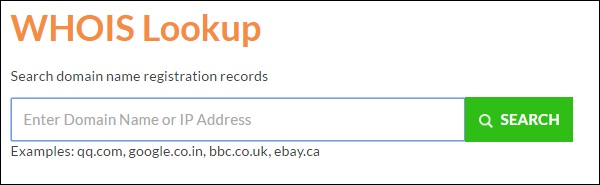
Whois
Here is a sample record of www.tutorialspoint.com extracted from WHOIS Lookup −
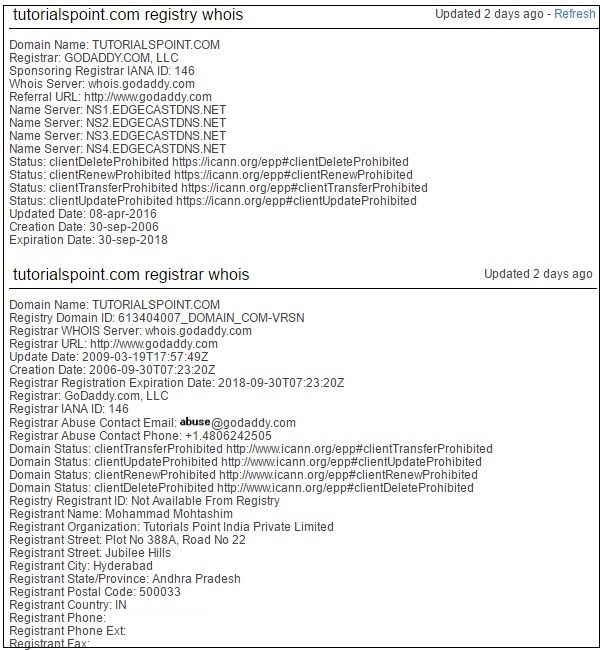
Whois Record

Quick Fix

It's always recommended to keep your domain name profile a private one which should hide the above-mentioned information from potential hackers.

Finding IP Address

You can use ping command at your prompt. This command is available on Windows as well as on Linux OS. Following is the example to find out the IP address of tutorialspoint.com
$ping tutorialspoint.com
It will produce the following result −
PING tutorialspoint.com (66.135.33.172) 56(84) bytes of data. 
64 bytes from 66.135.33.172: icmp_seq = 1 ttl = 64 time = 0.028 ms 
64 bytes from 66.135.33.172: icmp_seq = 2 ttl = 64 time = 0.021 ms 
64 bytes from 66.135.33.172: icmp_seq = 3 ttl = 64 time = 0.021 ms 
64 bytes from 66.135.33.172: icmp_seq = 4 ttl = 64 time = 0.021 ms

Finding Hosting Company

Once you have the website address, you can get further detail by using ip2location.com website. Following is the example to find out the details of an IP address −
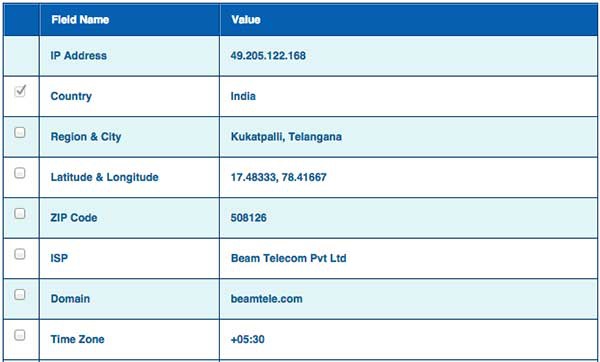
Ip2location
Here the ISP row gives you the detail about the hosting company because IP addresses are usually provided by hosting companies only.

Quick Fix

If a computer system or network is linked with the Internet directly, then you cannot hide the IP address and the related information such as the hosting company, its location, ISP, etc. If you have a server containing very sensitive data, then it is recommended to keep it behind a secure proxy so that hackers cannot get the exact details of your actual server. This way, it will be difficult for any potential hacker to reach your server directly.
Another effective way of hiding your system IP and ultimately all the associated information is to go through a Virtual Private Network (VPN). If you configure a VPN, then the whole traffic routes through the VPN network, so your true IP address assigned by your ISP is always hidden.

IP Address Ranges

Small sites may have a single IP address associated with them, but larger websites usually have multiple IP addresses serving different domains and sub-domains.
You can obtain a range of IP addresses assigned to a particular company using American Registry for Internet Numbers (ARIN).

Arin
You can enter company name in the highlighted search box to find out a list of all the assigned IP addresses to that company.

History of the Website

It is very easy to get a complete history of any website using www.archive.org.

Archive
You can enter a domain name in the search box to find out how the website was looking at a given point of time and what were the pages available on the website on different dates.
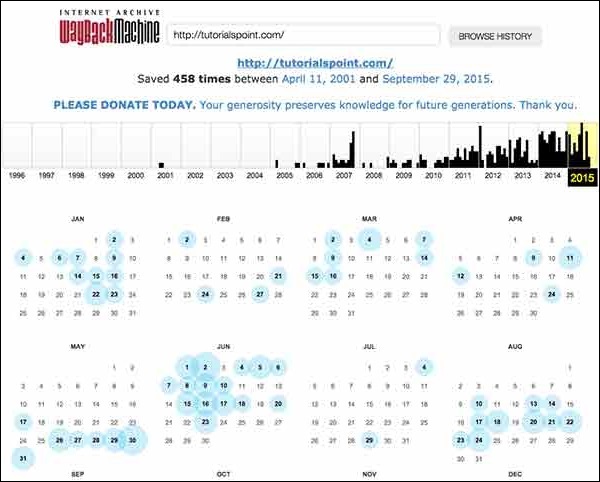
Archive Record

Quick Fix

Though there are some advantages of keeping your website in an archive database, but if you do not like anybody to see how your website progressed through different stages, then you can request archive.org to delete the history of your website.

Ethical Hacking - Reconnaissance

Information Gathering and getting to know the target systems is the first process in ethical hacking. Reconnaissance is a set of processes and techniques (Footprinting, Scanning & Enumeration) used to covertly discover and collect information about a target system.
During reconnaissance, an ethical hacker attempts to gather as much information about a target system as possible, following the seven steps listed below −
  • Gather initial information
  • Determine the network range
  • Identify active machines
  • Discover open ports and access points
  • Fingerprint the operating system
  • Uncover services on ports
  • Map the network
We will discuss in detail all these steps in the subsequent chapters of this tutorial. Reconnaissance takes place in two parts − Active Reconnaissanceand Passive Reconnaissance.

Active Reconnaissance

In this process, you will directly interact with the computer system to gain information. This information can be relevant and accurate. But there is a risk of getting detected if you are planning active reconnaissance without permission. If you are detected, then system admin can take severe action against you and trail your subsequent activities.

Passive Reconnaissance

In this process, you will not be directly connected to a computer system. This process is used to gather essential information without ever interacting with the target systems.

Ethical Hacking - Process

Like all good projects, ethical hacking too has a set of distinct phases. It helps hackers to make a structured ethical hacking attack.
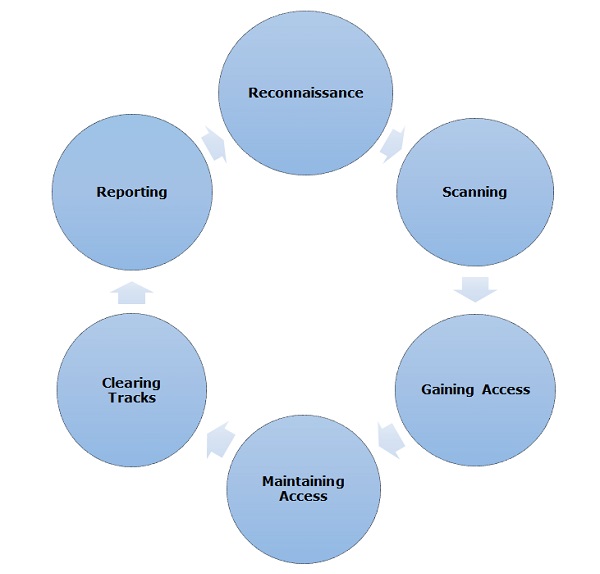
Different security training manuals explain the process of ethical hacking in different ways, but for me as a Certified Ethical Hacker, the entire process can be categorized into the following six phases.
Ethical Hacking Process

Reconnaissance

Reconnaissance is the phase where the attacker gathers information about a target using active or passive means. The tools that are widely used in this process are NMAP, Hping, Maltego, and Google Dorks.

Scanning

In this process, the attacker begins to actively probe a target machine or network for vulnerabilities that can be exploited. The tools used in this process are Nessus, Nexpose, and NMAP.

Gaining Access

In this process, the vulnerability is located and you attempt to exploit it in order to enter into the system. The primary tool that is used in this process is Metasploit.

Maintaining Access

It is the process where the hacker has already gained access into a system. After gaining access, the hacker installs some backdoors in order to enter into the system when he needs access in this owned system in future. Metasploit is the preferred tool in this process.

Clearing Tracks

This process is actually an unethical activity. It has to do with the deletion of logs of all the activities that take place during the hacking process.

Reporting

Reporting is the last step of finishing the ethical hacking process. Here the Ethical Hacker compiles a report with his findings and the job that was done such as the tools used, the success rate, vulnerabilities found, and the exploit processes.

Quick Tip

The processes are not standard. You can adopt a set of different processes and tools according to your techniques that you are comfortable with. The process is of least significance as long as you are able to get the desired results.

Ethical Hacking - Skills

As an ethical hacker, you will need to understand various hacking techniques such as −
  • Password guessing and cracking
  • Session hijacking
  • Session spoofing
  • Network traffic sniffing
  • Denial of Service attacks
  • Exploiting buffer overflow vulnerabilities
  • SQL injection
In this chapter, we will discuss some of the skills that you would require to become an expert in Ethical Hacking.

Basic Skills

Computer Hacking is a Science as well as an Art. Like any other expertise, you need to put a lot of effort in order to acquire knowledge and become an expert hacker. Once you are on the track, you would need more effort to keep up-to-date with latest technologies, new vulnerabilities and exploitation techniques.
  • An ethical hacker must be a computer systems expert and needs to have very strong programming and computer networking skills.
  • An ethical hacker needs to have a lot of patience, persistence, and perseverance to try again and again and wait for the required result.
Additionally, an ethical hacker should be smart enough to understand the situation and other users’ mind-set in order to apply social engineering exploits. A good ethical hacker has great problem-solving skills too.

Courses & Certifications

This tutorial provides the basic guidelines to become a successful Ethical Hacker. If you want to excel in this field, then you might choose to pursue the following courses and certifications −
  • Obtain a bachelor’s degree in Computer Science or A+ Certificate to gain an understanding of the most common hardware and software technologies.
  • Get into a programmer’s role for a few years and then switch to get a tech support position.
  • Proceed to get network certifications like Network+ or CCNA and then security certifications like Security+, CISSP, or TICSA.
  • It is recommended that you get some work experience as a Network Engineer and System Administrator to understand networks and systems inside out.
  • Keep going through various books, tutorials and papers to understand various computer security aspects and take them as a challenge to secure your network and computer systems as network security engineer.
  • Study courses which cover creating Trojan horses, backdoors, viruses, and worms, denial of service (DoS) attacks, SQL injection, buffer overflow, session hijacking, and system hacking.
  • Master the art of penetration testing, footprinting and reconnaissance, and social engineering.
  • Finally go for a Certified Ethical Hacker (CEH) Certification.
GIAC (Global Information Assurance Certification) and Offensive Security Certified Professional (OSCP) are additional IT security certifications which will add a lot of value to your profile.

Final Note

You need to stay as a White Hat Hacker which means you need to work within given boundaries. Never intrude or attack any computer or network without a required permission from the authorities.
As a final note, it is highly recommended that you refrain from engaging yourself in black hat hacking which may spoil your entire career.

Ethical Hacking - Tools

In this chapter, we will discuss in brief some of famous tools that are widely used to prevent hacking and getting unauthorized access to a computer or network system.

NMAP

Nmap stands for Network Mapper. It is an open source tool that is used widely for network discovery and security auditing. Nmap was originally designed to scan large networks, but it can work equally well for single hosts. Network administrators also find it useful for tasks such as network inventory, managing service upgrade schedules, and monitoring host or service uptime.
Nmap uses raw IP packets to determine −
  • what hosts are available on the network,
  • what services those hosts are offering,
  • what operating systems they are running on,
  • what type of firewalls are in use, and other such characteristics.
Nmap runs on all major computer operating systems such as Windows, Mac OS X, and Linux.

Metasploit

Metasploit is one of the most powerful exploit tools. It’s a product of Rapid7 and most of its resources can be found at: www.metasploit.com. It comes in two versions − commercial and free edition. Matasploit can be used with command prompt or with Web UI.
With Metasploit, you can perform the following operations −
  • Conduct basic penetration tests on small networks
  • Run spot checks on the exploitability of vulnerabilities
  • Discover the network or import scan data
  • Browse exploit modules and run individual exploits on hosts

Burp Suit

Burp Suite is a popular platform that is widely used for performing security testing of web applications. It has various tools that work in collaboration to support the entire testing process, from initial mapping and analysis of an application's attack surface, through to finding and exploiting security vulnerabilities.
Burp is easy to use and provides the administrators full control to combine advanced manual techniques with automation for efficient testing. Burp can be easily configured and it contains features to assist even the most experienced testers with their work.

Angry IP Scanner

Angry IP scanner is a lightweight, cross-platform IP address and port scanner. It can scan IP addresses in any range. It can be freely copied and used anywhere. In order to increase the scanning speed, it uses multithreaded approach, wherein a separate scanning thread is created for each scanned IP address.
Angry IP Scanner simply pings each IP address to check if it’s alive, and then, it resolves its hostname, determines the MAC address, scans ports, etc. The amount of gathered data about each host can be saved to TXT, XML, CSV, or IP-Port list files. With help of plugins, Angry IP Scanner can gather any information about scanned IPs.

Cain & Abel

Cain & Abel is a password recovery tool for Microsoft Operating Systems. It helps in easy recovery of various kinds of passwords by employing any of the following methods −
  • sniffing the network,
  • cracking encrypted passwords using Dictionary, Brute-Force and Cryptanalysis attacks,
  • recording VoIP conversations,
  • decoding scrambled passwords,
  • recovering wireless network keys,
  • revealing password boxes,
  • uncovering cached passwords and analyzing routing protocols.
Cain & Abel is a useful tool for security consultants, professional penetration testers and everyone else who plans to use it for ethical reasons.

Ettercap

Ettercap stands for Ethernet Capture. It is a network security tool for Man-in-the-Middle attacks. It features sniffing of live connections, content filtering on the fly and many other interesting tricks. Ettercap has inbuilt features for network and host analysis. It supports active and passive dissection of many protocols.
You can run Ettercap on all the popular operating systems such as Windows, Linux, and Mac OS X.

EtherPeek

EtherPeek is a wonderful tool that simplifies network analysis in a multiprotocol heterogeneous network environment. EtherPeek is a small tool (less than 2 MB) that can be easily installed in a matter of few minutes.
EtherPeek proactively sniffs traffic packets on a network. By default, EtherPeek supports protocols such as AppleTalk, IP, IP Address Resolution Protocol (ARP), NetWare, TCP, UDP, NetBEUI, and NBT packets.

SuperScan

SuperScan is a powerful tool for network administrators to scan TCP ports and resolve hostnames. It has a user friendly interface that you can use to −
  • Perform ping scans and port scans using any IP range.
  • Scan any port range from a built-in list or any given range.
  • View responses from connected hosts.
  • Modify the port list and port descriptions using the built in editor.
  • Merge port lists to build new ones.
  • Connect to any discovered open port.
  • Assign a custom helper application to any port.

QualysGuard

QualysGuard is an integrated suite of tools that can be utilized to simplify security operations and lower the cost of compliance. It delivers critical security intelligence on demand and automates the full spectrum of auditing, compliance and protection for IT systems and web applications.
QualysGuard includes a set of tools that can monitor, detect, and protect your global network.

WebInspect

WebInspect is a web application security assessment tool that helps identify known and unknown vulnerabilities within the Web application layer.
It can also help check that a Web server is configured properly, and attempts common web attacks such as parameter injection, cross-site scripting, directory traversal, and more.

LC4

LC4 was formerly known as L0phtCrack. It is a password auditing and recovery application. It is used to test password strength and sometimes to recover lost Microsoft Windows passwords, by using dictionary, brute-force, and hybrid attacks.
LC4 recovers Windows user account passwords to streamline migration of users to another authentication system or to access accounts whose passwords are lost.

LANguard Network Security Scanner

LANguard Network Scanner monitors a network by scanning connected machines and providing information about each node. You can obtain information about each individual operating system.
It can also detect registry issues and have a report set up in HTML format. For each computer, you can list the netbios name table, current logged-on user, and Mac address.

Network Stumbler

Network stumbler is a WiFi scanner and monitoring tool for Windows. It allows network professionals to detect WLANs. It is widely used by networking enthusiasts and hackers because it helps you find non-broadcasting wireless networks.
Network Stumbler can be used to verify if a network is well configured, its signal strength or coverage, and detect interference between one or more wireless networks. It can also be used to non-authorized connections.

ToneLoc

ToneLoc stands for Tone Locator. It was a popular war dialling computer program written for MS-DOS in the early 90’s. War dialling is a technique of using a modem to automatically scan a list of telephone numbers, usually dialling every number in a local area code.
Malicious hackers use the resulting lists in breaching computer security - for guessing user accounts, or locating modems that might provide an entry-point into computer or other electronic systems.
It can be used by security personnel to detect unauthorized devices on a company’s telephone network.

Ethical Hacking - Terminologies

Following is a list of important terms used in the field of hacking.
  • Adware − Adware is software designed to force pre-chosen ads to display on your system.
  • Attack − An attack is an action that is done on a system to get its access and extract sensitive data.
  • Back door − A back door, or trap door, is a hidden entry to a computing device or software that bypasses security measures, such as logins and password protections.
  • Bot − A bot is a program that automates an action so that it can be done repeatedly at a much higher rate for a more sustained period than a human operator could do it. For example, sending HTTP, FTP or Telnet at a higher rate or calling script to create objects at a higher rate.
  • Botnet − A botnet, also known as zombie army, is a group of computers controlled without their owners’ knowledge. Botnets are used to send spam or make denial of service attacks.
  • Brute force attack − A brute force attack is an automated and the simplest kind of method to gain access to a system or website. It tries different combination of usernames and passwords, over and over again, until it gets in.
  • Buffer Overflow − Buffer Overflow is a flaw that occurs when more data is written to a block of memory, or buffer, than the buffer is allocated to hold.
  • Clone phishing − Clone phishing is the modification of an existing, legitimate email with a false link to trick the recipient into providing personal information.
  • Cracker − A cracker is one who modifies the software to access the features which are considered undesirable by the person cracking the software, especially copy protection features.
  • Denial of service attack (DoS) − A denial of service (DoS) attack is a malicious attempt to make a server or a network resource unavailable to users, usually by temporarily interrupting or suspending the services of a host connected to the Internet.
  • DDoS − Distributed denial of service attack.
  • Exploit Kit − An exploit kit is software system designed to run on web servers, with the purpose of identifying software vulnerabilities in client machines communicating with it and exploiting discovered vulnerabilities to upload and execute malicious code on the client.
  • Exploit − Exploit is a piece of software, a chunk of data, or a sequence of commands that takes advantage of a bug or vulnerability to compromise the security of a computer or network system.
  • Firewall − A firewall is a filter designed to keep unwanted intruders outside a computer system or network while allowing safe communication between systems and users on the inside of the firewall.
  • Keystroke logging − Keystroke logging is the process of tracking the keys which are pressed on a computer (and which touchscreen points are used). It is simply the map of a computer/human interface. It is used by gray and black hat hackers to record login IDs and passwords. Keyloggers are usually secreted onto a device using a Trojan delivered by a phishing email.
  • Logic bomb − A virus secreted into a system that triggers a malicious action when certain conditions are met. The most common version is the time bomb.
  • Malware − Malware is an umbrella term used to refer to a variety of forms of hostile or intrusive software, including computer viruses, worms, Trojan horses, ransomware, spyware, adware, scareware, and other malicious programs.
  • Master Program − A master program is the program a black hat hacker uses to remotely transmit commands to infected zombie drones, normally to carry out Denial of Service attacks or spam attacks.
  • Phishing − Phishing is an e-mail fraud method in which the perpetrator sends out legitimate-looking emails, in an attempt to gather personal and financial information from recipients.
  • Phreaker − Phreakers are considered the original computer hackers and they are those who break into the telephone network illegally, typically to make free longdistance phone calls or to tap phone lines.
  • Rootkit − Rootkit is a stealthy type of software, typically malicious, designed to hide the existence of certain processes or programs from normal methods of detection and enable continued privileged access to a computer.
  • Shrink Wrap code − A Shrink Wrap code attack is an act of exploiting holes in unpatched or poorly configured software.
  • Social engineering − Social engineering implies deceiving someone with the purpose of acquiring sensitive and personal information, like credit card details or user names and passwords.
  • Spam − A Spam is simply an unsolicited email, also known as junk email, sent to a large number of recipients without their consent.
  • Spoofing − Spoofing is a technique used to gain unauthorized access to computers, whereby the intruder sends messages to a computer with an IP address indicating that the message is coming from a trusted host.
  • Spyware − Spyware is software that aims to gather information about a person or organization without their knowledge and that may send such information to another entity without the consumer's consent, or that asserts control over a computer without the consumer's knowledge.
  • SQL Injection − SQL injection is an SQL code injection technique, used to attack data-driven applications, in which malicious SQL statements are inserted into an entry field for execution (e.g. to dump the database contents to the attacker).
  • Threat − A threat is a possible danger that can exploit an existing bug or vulnerability to compromise the security of a computer or network system.
  • Trojan − A Trojan, or Trojan Horse, is a malicious program disguised to look like a valid program, making it difficult to distinguish from programs that are supposed to be there designed with an intention to destroy files, alter information, steal passwords or other information.
  • Virus − A virus is a malicious program or a piece of code which is capable of copying itself and typically has a detrimental effect, such as corrupting the system or destroying data.
  • Vulnerability − A vulnerability is a weakness which allows a hacker to compromise the security of a computer or network system.
  • Worms − A worm is a self-replicating virus that does not alter files but resides in active memory and duplicates itself.
  • Cross-site Scripting − Cross-site scripting (XSS) is a type of computer security vulnerability typically found in web applications. XSS enables attackers to inject client-side script into web pages viewed by other users.
  • Zombie Drone − A Zombie Drone is defined as a hi-jacked computer that is being used anonymously as a soldier or 'drone' for malicious activity, for example, distributing unwanted spam e-mails.